
CPU Frequency, Power, and Temperatures
The information below is taken from HWInfo64, which takes the information from motherboard and CPU sensors. A 10 minutes loop of Cinebench R23 was used to load the system.
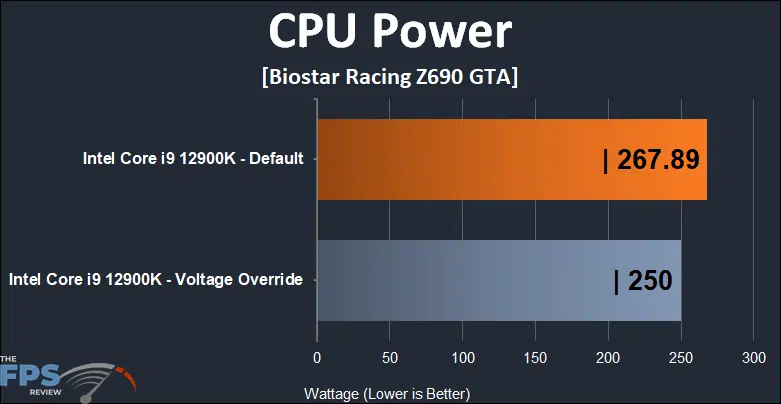
One thing that’s very interesting about the BIOSTAR Racing Z690 GTA when looking at the power data in HWInfo64 is that the board defaults to the unlimited PL1 Power Limit value of 4095w. If you reset the UEFI to optimized values, this is what you’ll get. Interestingly, this also lead to the CPU pulling additional power that it didn’t need to which didn’t result in a higher clock speed but did give us higher temperatures. Using automatic voltages, I saw temperatures of 100c frequently, though it didn’t report throttling in HWInfo64.
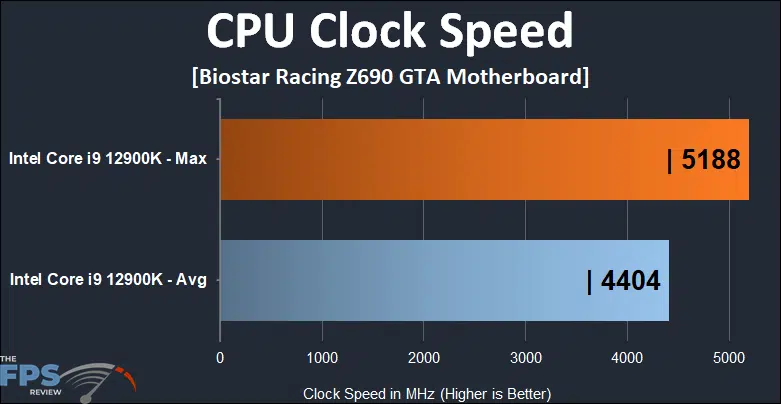
The CPU clocks are the average we saw during the Cinebench R23 loop and the maximum reported clocks shown in HWInfo64 during that test. Interestingly enough, the power settings had no discernable impact on the clock speeds either way. There were some temperature and power differences but no impact on clocks beyond a run to run variance.
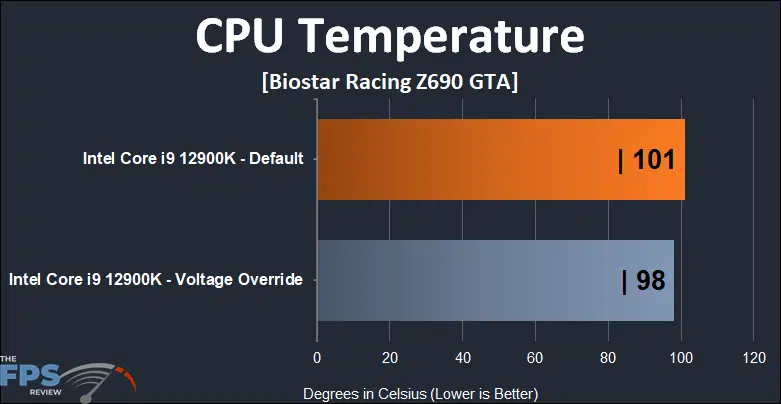
As stated above, the temperatures were borderline. While no throttling occurred, it was obviously close to it. For this testing, all I had available was a 280mm AIO with the proper LGA 1700 mounting bracket. Even at full speed on the pump and fans, the 12900K is too much for the little AIO with no power limits. You can use an AIO with the 12900K, but tuning and even undervolting may be a good idea to keep temps in check. It’s worth noting that the Maximus Z690 Extreme test system didn’t run this hot under custom cooling and provided similar clocks and power consumption.
Discussion (19 replies)
Join Discussion →Ooooh..
A racing motherboard.
What will they think of next? :p
Do we have scuba yet?
Well, I tell you......
I just finished building a Z690 PC for my daughter.
I used the ASUS Tuf DDR4 model.
For 289 it is very much like this Biostar. A very nice feature set for a pretty ressonable price.
The high range boards are really expensive this time around.
Maybe Im getting old,but 300 used to be outrageous......now its considered "cheap".
It is. I'm running an ASUS ROG Maximus Z690 Extreme which is one of the more expensive options out there excluding the Glacial model and the Z690 GODLIKE which cost twice as much. The ceiling for a motherboard without a monoblock is around $1,100 and $2,000 for ones that do.
There are too many gullible fools in the market these days.
They take a mid range motherboard. Add maybe $100 worth of added premium features to it, and maybe $50 worth in racy paint jobs, heatsinks that look like weapons and colorful lighting, and then charge $800 more for it. $650 in easy money right from the lowest common denominator.
The rest of us who see the obvious are then stuck trying to decide if we really need those premium features enough to be willing to pay more than 6 times the price they are worth for them...
Intelligent, technically inclined people used to build PC's. Now it's fickle streamer/youtuber fashion whore types make up most of the market, and that's reflecting the types of products we are getting. No substance, all show and at a serious premium.
I'd say that there's just a lot more to it. Not to say that there isn't an 'early adopter tax' going on here, but that we're not really violating supply vs. demand.
One can get an LGA1700 board for US$90.
I'll take my prior board, the US$399 Gigabyte Z690 Aero D, which has enough power delivery for a 12900K in a custom loop (400W easily, if the CPU could handle it), four NVMe slots, two Thunderbolt 4 ports, 2.5Gbit Intel LAN and 10Gbit Marvell LAN, and of course Intel AX Wifi.
In my mind, that board was absolutely worth its featureset, when considering the 10Gbit LAN and Thunderbolt 4 options would add around US$100 each and you wouldn't be able to use both of them on any board without sacrificing PCIe lanes to the GPU - and probably also NVMe slots.
But here's the real kicker: Z690 is hard
And by hard, I mean that good implementations are really worth a bit more. You see, I don't have that Gigabyte board today because it a) wasn't stable at any DDR5 speed from 6000 on up and b) it really, really liked killing G.Skill memory sticks. In researching the issues that I ran into, I found that I wasn't the only one having problems with Gigabyte and Z690 - and that the problems likely centered on how RGB had been implemented. Thing is, other folks were having issues with Gigabyte's DDR4 boards too - very similar to what @Dan_D noted in his review with Biostar.
Now, these could be rectified at any time by a software update, BIOS update, DDR5 revision, or some combination of the above - but what I can say for certain is that the MSI MEG Z690 ACE, a 50% increase in price and a reduction in features (no 10Gbit) from the Gigabyte Z690 Aero D, hasn't had this issue. It still can't run DDR5-6000+ stable, but it also hasn't killed any DDR5 modules either.
Parting thoughts:
Gigabyte's had a rough go at Z690. They're not the only ones - every manufacturer has struggled, especially with DDR5 boards. This is round one, and I don't really hold it against Gigabyte - I have several of their boards on hand for personal builds. One Z390 ITX board that has served well over the years, and I just picked up - meaning after my struggles with their Z690 board - one of their B550 ITX boards as well. It's currently hosting a 5700G and running spectacularly.
Also, mentioning Newegg here. They took my Gigabyte board back after the return period had ended. I realize that they're still smarting from having their return process thrown in the spotlight by Gamers' Nexus, but I feel it's important to highlight good behavior on the part of vendors.
Gigabyte huh?
I wonder if there is more going on here than we realize. Gigabyte sure seems to be having a lot of issues lately. My TRX40 Aourus Master was a hot mess as well. Killed 3x Threadrippers on me before I found links to forum posts online about incorrect voltages in some Gigabyte boards that presumably was the issue.
First time I RMA'd the board they returned it to me with "no fault found". Only after the second time I RMA'd it did they replace it with a new revision board, and now it's just sitting here gathering dust, as I bought an Asus board in the meantime as I was tired of waiting to have a functional desktop.
In other words, tiny sample size, but between your board that was killing ram sticks, mine that was killing threadrippers, their "explosive" power supplies... I'm wondering if something is going awry over at Gigabyte.
I really wouldn't go to far with it. When I said every manufacturer has had issues with DDR5, that's very real - ASUS' premier memory overclocking line, the Apex, has had unending complaints with some users unable to push memory at all while others are pushing to the limits of watercooling setups - running 1.6v+ on memory that starts at 1.1v. One of the more famous overclockers on YouTube runs Gigabyte boards for the most part and hasn't mentioned this yet.
The failure mode I was seeing was pretty weird, too. One - and only one - stick would die. But it wouldn't take the system with it. In fact, I was hard pressed to even notice, which is why it took me so long to zero in on it. Basically, one stick would report everything about itself correctly, except for showing '0MB' as opposed to the expected 16384MB.
And... that's it. Thing is, with DDR5, the only really 'viable' configuration on the market since release has been 2x16GB. Well, with 1x16GB DDR5, you have plenty enough RAM for a lot of things - and even in single-channel mode, you still have enough bandwidth to not even notice that you only have one module working. I gamed and edited photos on the system while a stick was in this failure mode.
I figure that DDR5, like your TRX40 system, is one of those niches where there are so many moving parts and just enough margin for guesswork due to lower volume and lower testing resources that hiccups like these are bound to happen. We're enthusiasts, this is part of the hobby, right?
So I try to focus more on how companies handle these things than how they occasionally slip up.
There is a lot more to the cost of a board like the ASUS ROG Maximus Z690 Extreme than you'd think. No, I don't think it costs $1,100 to make. I know ASUS has to make a profit and I'm sure there is a healthy margin in it. However, it's not nearly as large as you might imagine. Computer hardware rarely has a lot of profit margin in it unless its super high end.
There are a lot of little details that differentiate the ROG Maximus Z690 Extreme from something like the BIOSTAR Racing Z690 GTA. First off, 90A power stages aren't cheap. Then you have things like the more expensive voltage controllers, diagnostic features, additional thermal sensors and monitoring stuff. Even the ability to flash a BIOS without an installed CPU and RAM takes specialized ASICs.
Is all that stuff worth it? Not for most people. But it's fair to say that people falsely assume that you are only paying extra for some bling and that's simply not true.
Also, while you can get an LGA 1700 motherboard for $90, it's not necessarily a good idea.
We shall see on the APEX. It's next.
I agree with your statement here. Was running a Z690 Aorus master with Aorus DDR5 6000mhz and all of a sudden I got memory errors that I couldn't quite narrow down to either the memory or mother board because of the error codes being given. I ended up sending both back inside of the return window and went with an MSI DDR4 board this time around. Maybe in some cases/manufacturers DDR5 isn't quite ready.
Every motherboard brand has its issues from time to time. That being said, GIGABYTE is a popular brand and one of the largest out there. It's possible they do have a widespread issue, or it could simply be that we are hearing more about their boards due to that popularity. GIGABYTE has been a go to brand for enthusiasts for several years now.
Keep in mind that it has eclipsed ASUS at some times. It may be more popular now. That being said, I don't have any clear indication of what might be going on here, if there is anything specific going on at all.
DDR5 is a new memory technology and first generation products using it are always a bit of a mess. Normally, my experiences with high end ASUS boards is superb. I've had occasional BSOD's with my current setup and that's improved over time as Windows 11 and UEFI updates have been applied. It may simply be a matter of product maturity.
As a side note, the board in this review had some issues with various memory kits of DDR4 as noted in the review. So we have a new chipset, a new CPU, new memory technology and Windows 11 to content with all at once in some cases.
I've been using them for over twenty years and this is the first real issue I've had with them honestly. This just gave me an excuse to try something different.
Just realized you listed RAM from Gigabyte as well - there was a point where I'd wished I'd gotten ahold of a Gigabyte kit DDR5 to try.
Instead, I had an Adata DDR5 6000 kit I started off with, and it wasn't happy, but I readily admit that I simply didn't have the knowledge at the time to dig in deeper. I'm now months of research and testing into understanding DDR5, but even just memory overclocking in general, on both Intel and AMD.
I've used... ASUS, Gigabyte, and now MSI for Z690. I'll say that Gigabyte's UEFI was the least well-developed, but a lot of that was trying to figure out what they'd named things and how that mapped to... how others named things, not just ASUS / MSI in their respective BIOSs but also tools like HWINFO64.
Learned a lot digging into some of that stuff, and wish I could've applied it to the Gigabyte Z690 Aero D. Wonder if I shouldn't pick up a 'Z790' Gigabyte board when those come out to see how they're doing, as I expect there's going to be plenty of 'lessons learned' coming out of this experience!
It was well built and the heaviest memory I have ever owned due to their heat spreaders. I never had Aorus memory, and I am 85% sure that was the culprit. Looking back I should have kept the board and got different memory, but didn't want to take the risk of missing my return window for both just in case it was the board.
I have used a few boards since this post. I have used EVGA and now Asus and I have been happy with both. I couldn't bring myself to go with an Aorus Master again after the issue I had with their boards. Might have been a fluke, but I wasn't taking a chance.