
Power Temperature and Frequency
We will now test power and temperature on each CPU, as well as the frequency on the Ryzen 9 7900X. To run these tests we ran Cinebench R23 for 10 minutes and took readings according to HWiNFO64, latest version.
Power
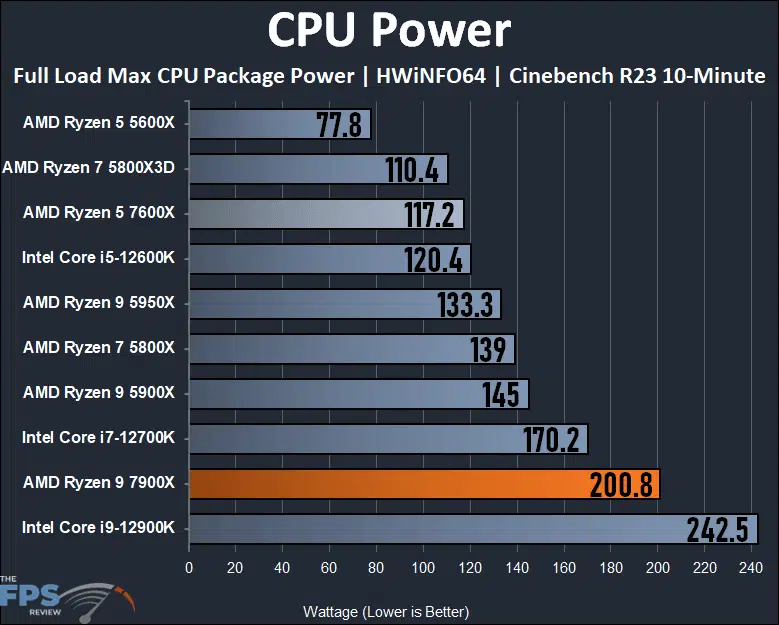
Looking at the CPU Package Power result, the new Ryzen 9 7900X has the second most power draw. However, it is not close to the Intel Core i9-12900K. The Intel Core i9-12900K still consumes the highest power draw at 242W.
The new Ryzen 9 7900X consumes more power than the last generation did, but only by 55W compared to the Ryzen 9 5900X. At 170W TDP the reported socket power of the CPU can be up to 230W, but as you can see ours is shy of that and actually performs under 230W. The Ryzen 9 7900X is running much more efficiently in power consumption compared to the Intel Core i9-12900K. Though the 7900X runs with a higher power, it’s not exorbitant and saves 40W of power over the 12900K at full tilt.
Temperature
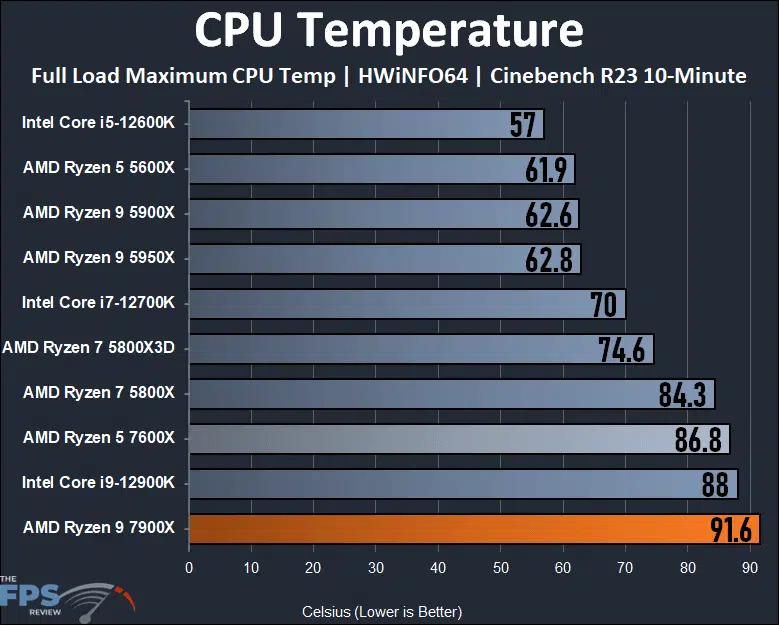
In terms of temperature, the AMD Ryzen 9 7900X does run with the highest temperature at 91.6c. This is with our MSI MEG CORELIQUID S360 AIO at full blast, full fan speeds, and pump speed. That’s about 30 degrees hotter than the Ryzen 9 5900X it replaces. Again, AMD states that 95c is the TjMax, and the intended temperature it can run at 24/7 safely. The CPUs are designed to function at this temperature, and ours did not hit 95c, it did come under it by a few degrees and stayed there. Again note that we do have our 360mm AIO with the highest fan speeds and pump speeds running. A 240mm AIO is going to potentially going to allow it to reach 95c at full-load.
CPU Frequency
The CPU Boost Frequency is up to 5.6GHz on the Ryzen 9 7900X. What we want to know though is how high it can attain when running all cores at the same time. For this test, we again ran Cinebench R23 to see in HWiNFO64 what all the cores looked like.
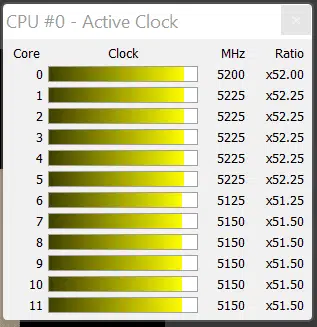
As you can see, running all the cores at full-throttle in Cinebench R23 the Ryzen 9 7900X can achieve around a 5.125-5.225GHz on all cores. It appears that one core is running the lowest at 5125MHz, while 5 cores are running at 5150MHz, one core at 5200MHz, and then the rest at 5225MHz. These cores switch around, and the frequency varies between them, including which ones are at the 5150 or 5225 clock speed. That range though seems to be what it runs at when pushing it in something like Cinebench R23 at full tilt, about 5125-5225MHz (5.1-5.2GHz). Now on single-core or single-thread, we did witness it hitting the 5.6GHz boost clock easily, and often when gaming as well.
Discussion (12 replies)
Join Discussion →I was interested in the 7000 series, but for gaming the performance difference with my 12700k is not there, power draw also is worse as are temps.
Will see what intel brings, so far it looks like I will skip upgrading my CPU for now.
Ugh.
I wasn't thrilled about Intel because of the higher power draw, and AMD goes and follows in their footsteps. It's not quite as bad as Intel, but it's a lot worse than Zen3 was.
But yeah, for gaming, the only real difference on the chart - aside from the 5800x3d - seems to be if you are running DDR4 or DDR5.
But the 5800X3D, using 100W less, on DDR4 and still punching in that weight class. Damn. They should just keep making that chip for gaming. Zen4 looks nice for rendering and workstation-ish tasks though, but for general purpose or gaming I don't see any reason to do anything other than a 5800X3D if I were building a new system right now. That really was my take away from all of this.
As usual Brent, excellent review!
GN's review of the 7950X explains AMDs strategy for the high temps.
[embedded media]
No need to dive into all of their benchmarks but they explain the high temp and power usage.
Nice review guys.
I have 5700x so not ready jump in just yet. Will wait for things to mature and affordable motherboards.
Microcenter is running a promo right now though, buy a 7700x or higher and get a free 32gb DDR5 g.skill kit. It's ddr5-5600 though... maybe they are clearing out inventory of the slower speeds? Who knows maybe it can be overclocked to 6000.
In store only though. Of course.
Maybe next year when the X670 platform and DDR5 gets cheaper, I can use a 7900X to finally replace my 5930K. Assuming I can get the funds. Would also be really nice to see Zen 4 on Threadripper non-Pro.
I'm leaning towards going with Intel right now, as the Z690 platform looks decent enough and I can get Thunderbolt and 10G Ethernet on a Mobo for under $300
If this is the one you're thinking of: https://www.newegg.com/p/N82E16813145376?Item=N82E16813145376&quicklink=true
I had to return mine to Newegg - it killed three DDR5 kits from G.Skill (which I also had to return) inside of two months. Can't say if it's still a problem as it's not a very popular board and there is very little data available.
Other options I'm seeing go up quite a bit in price. In general, Thunderbolt doesn't seem to be that popular, and you're better off using a 10Gbit card if that's what you need.
I have to admit, having both a Mac and PC, I honestly can't say what's Thunderbolt and what's USB-C anymore.
I used to have a bit of Thunderbolt stuff - it was first/second generation. Back when it used mini-DisplayPort plugs. Then it was distinct and you knew it wasn't just USB (although I have seen people plug them into their video cards and wonder why their backup drive doesn't work there). But now - I don't think I have anything that's Gen 3/4, but honestly wouldn't know how to tell.
The branding / marketing has been a mess on both sides.
I have to agree the new am5 socket motherboards are surprisingly expensive. I have to wonder I'd that is an early adopter tax + a sign of the times or something new.
Seems like the x570 started out the same way
Three main reasons:
They did, but consider - MSIs 'enthusiast'-oriented line is the Carbon, ASUS' is the Strix-E - these are the lowest-end boards in their respective product stacks that feature a post code display, while having essentially equivalent power delivery and memory speed support of higher-end boards. Going further up the stack gets you into the territory of boards that have all that and better connectivity, as well as typically features that support sub-ambient cooling (chilled water, dry ice, LN2...) and extreme overclocking (meaning, benchmarkable but beyond reasonable for daily use).
The prices of these boards have gone up too. While X570 more or less caught AMD up to Intel in terms of feature parity on the boards, X670E seeks to match Intel right out of the gate and appears to have largely succeeded. Just at a cost!
They're working on putting better markers on the ports themselves, and for USB4 on the release set of X670E boards, they're using Intel's TB4 controller. They can't call it TB4 apparently because the implementation isn't certified by Intel (I'm quoting Wendel at L1T here), but as TB4 is a full superset and then some of USB4, at least these boards shouldn't have compromises.
What we all need to watch out for, though, is future USB4 'cut-down' implementations. USB4 allows for lower data rates and lower power delivery than TB4.
Nice review. It looks like I'll stick with my 12900K.