
Test Setup
More information on our GPU testing can be found here.
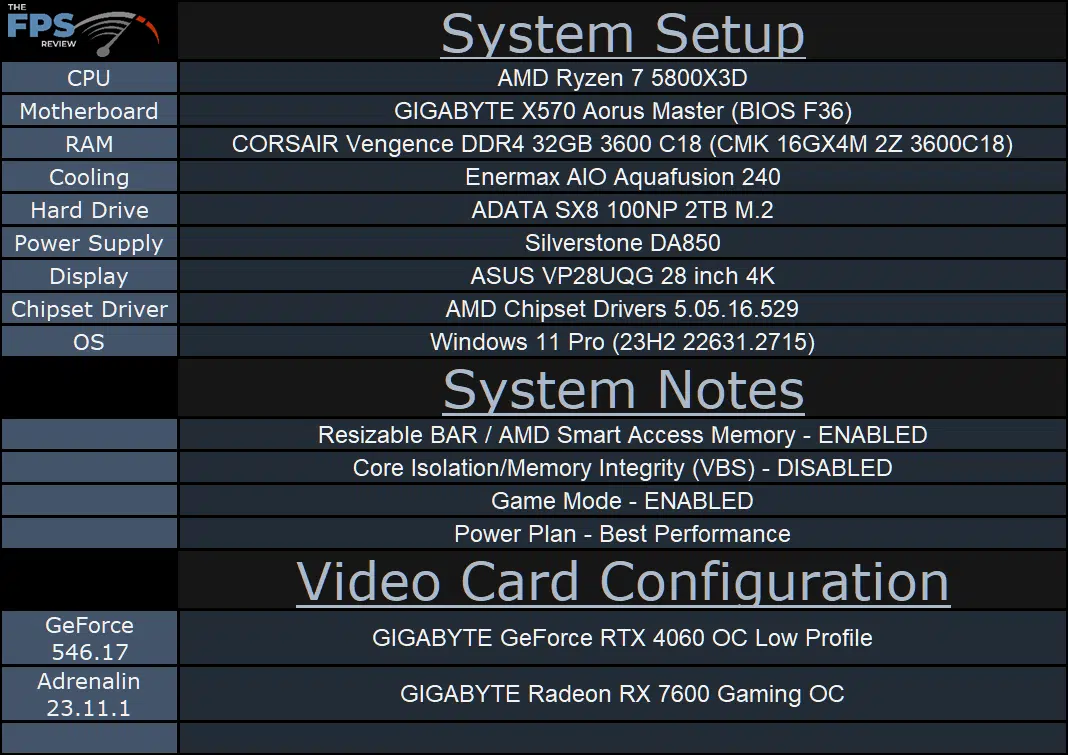
We are using the motherboard’s current default BIOS settings on the latest official release BIOS. We have enabled PCI-Express Resizable BAR in the motherboard BIOS. This means we are utilizing Resizable BAR on NVIDIA GPUs and AMD Smart Access Memory on AMD GPUs in all of our testing. We have enabled DOCP in the BIOS for the memory. We are using a fresh install of Windows 11 Pro with the latest Windows Updates, and drivers installed including the latest chipset drivers from AMD. We are using the “Best Performance” power profile in Windows Settings. We have hardware-accelerated GPU Scheduling at the default setting, which is ENABLED. VBS is DISABLED and Game Mode is ENABLED.
Discussion (2 replies)
Join Discussion →I wish this existed 6 months ago when I was in the market for a mid range GPU.
Nice to see modern LP options. But outside of upgrading the GPU on that off-lease Dell office desktop PC, does this have a real use scenario? Even M-ITX stuff lately takes full height cards (but maybe width/depth are bigger issues there)
edit - oh I see it needs an 8 pin pci-e power, that could be a challenge for the Dell scenario I was talking about