
Gameplay Performance – DLSS Frame Generation Latency
*Take Note* – The performance shown below is not FPS, it is in fact PC Latency represented in milliseconds. We utilized NVIDIA FrameView to capture statistics while playing these games, and are showing the AvgPCLatency and MaxPCLatency results as indicated by NVIDIA FrameView data. For Latency, the lower the number, the better. Therefore, we are showing the MaxPCLatency which shows the highest latency number achieved in the run-through, which would be a “bad” result, you really want the Max Latency to be as low as it can be for the best experience while gaming.
The goal of the data below is to examine the Latency differences between Native resolution, Upscaling being enabled, and then Frame Generation, including DLSS 4 2X Frame Gen, 3X Frame Gen, and 4X Frame Gen. In all results, NVIDIA Reflex is automatically enabled with Frame Generation turned on. In the graphs, DLSS 4 is indicated where the new DLSS 4 Upscaling Transformer model is being used, as well as the new DLSS 4 Frame Generation. We have one game, Stalker 2, though, shown with the previous DLSS 3 Upscaling and Frame Gen also shown, only Alan Wake 2 is using the newer DLSS 4 algorithms. We are using a beta dev build of Alan Wake 2 provided by NVIDIA that utilizes the newer DLSS 4 for Upscaling and Frame Gen.
Alan Wake 2 – 4K
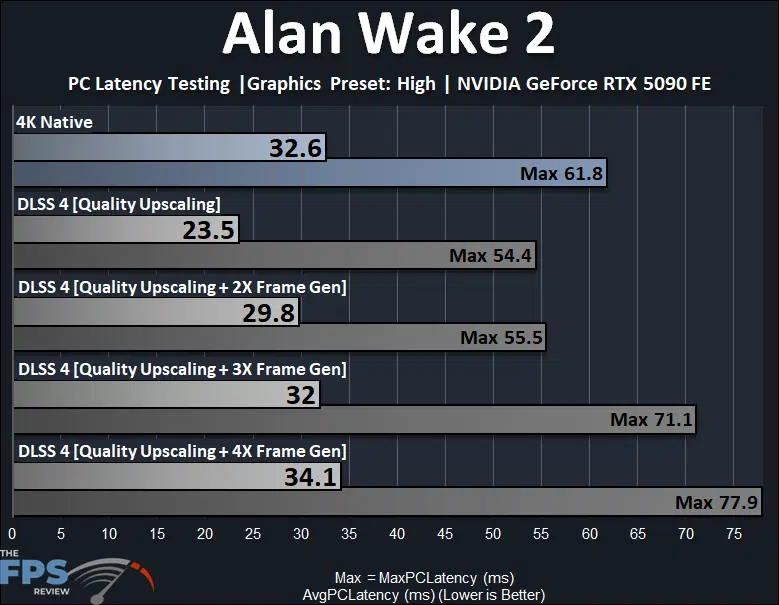
In Alan Wake 2, we are testing at 4K resolution on the NVIDIA GeForce RTX 5090, using the beta dev build of this game which supports DLSS 4, and we are testing with the “High” in-game quality preset. The above data is not frames per second, but rather latency in milliseconds, lower is better. At 4K native resolution, the average latency is 32.6ms, and the maximum it hits is 61.8ms. When we enable DLSS 4 Upscaling the latency drops all the way down to 23.5ms average and max 54.4ms, which is great, the game is more responsive.
As we increase Frame Generation, the latency does increase, but it does stay under the native resolution latency until about 2X Frame Gen, which is the standard Frame Gen seen in the previous version as well of DLSS. When we engage 3x and 4x Frame Gen, we then see the latency increase beyond the native resolution latency. The average increases, but more importantly the maximum latency increases by a lot, a way lot, up to 70ms, and 78ms at 4x. This increase in latency is bad for the experience of actually playing the game, the responsiveness is worse than the native resolution, and way worse than just using DLSS 4 Upscaling component.
This shows how enabling Frame Generation adds latency, and even with Reflex, cannot stay on par with the results without Frame Gen, and can never match the incredible latency experienced with just Upscaling, which is a much better experience, and much more responsive. The latency with just UPscaling enabled is simply the best experience, and that cannot be matched with Frame Gen.
Alan Wake 2 – 4K RT
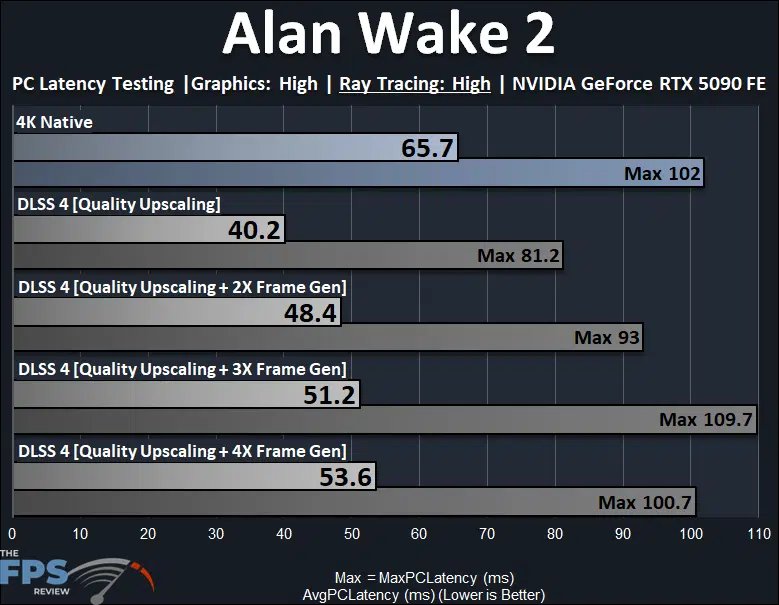
Now we are pushing Alan Wake 2 up to 4K with the “High” Ray Tracing option enabled. This moves the actual framerate quite down, down to 41FPS at 4K, so this shows what happens when the base framerate is already very low, and what Frame Gen does to the latency with lower framerates. Well, the result is actually quite shocking, the latency becomes very high at 4K native resolution actually, 65ms average and up to 102ms max.
However, enabling DLSS 4 Upscaling only improves latency a lot here, down to 40ms average and max of 81ms, this is a much better experience. Then, when we enable Frame Generation the latency starts to climb. Interestingly, the average latency stays below the native resolution (but higher than Upscaling), but the maximum latency can increase back to as bad as it was at the native resolution. Once again, Upscaling provides the best latency, and Frame Generation increases latency beyond that and can never be as good as just Upscaling, for latency.
Alan Wake 2 – 1440p RT
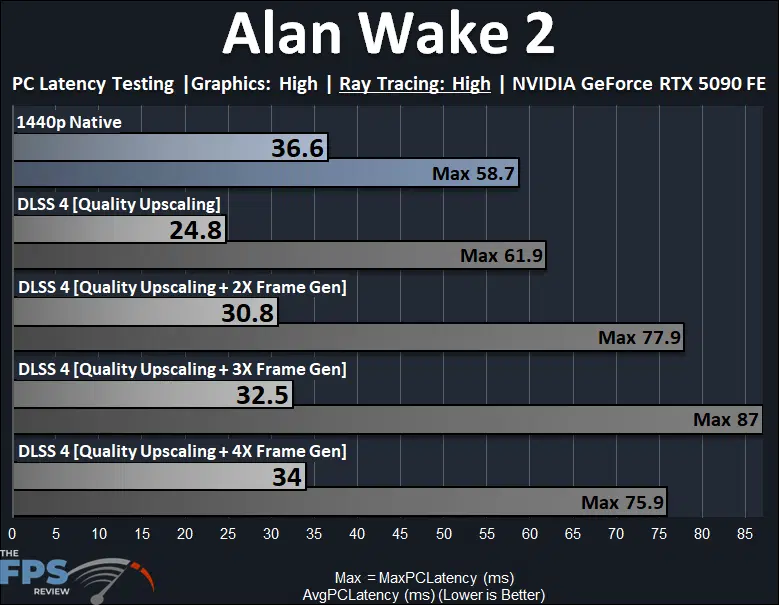
We wanted to back off on the framerate and give the video card a little break by lowering to 1440p, but still with Ray Tracing enabled. We see the latency is quite ok at 1440p native, the average is good, max is 58.7ms. When we enable Upscaling the latency decreases quite a bit to 24ms, but the max is near the same as without. This graph shows a pretty linear increase of latency on the average and max, as you go up in Frame Gen levels. Upscaling always has the best latency, and Frame Gen always adds to it, and the maximum latency can get quite high with Frame Gen as the levels increase.
S.T.A.L.K.E.R. 2: Heart of Chornobyl
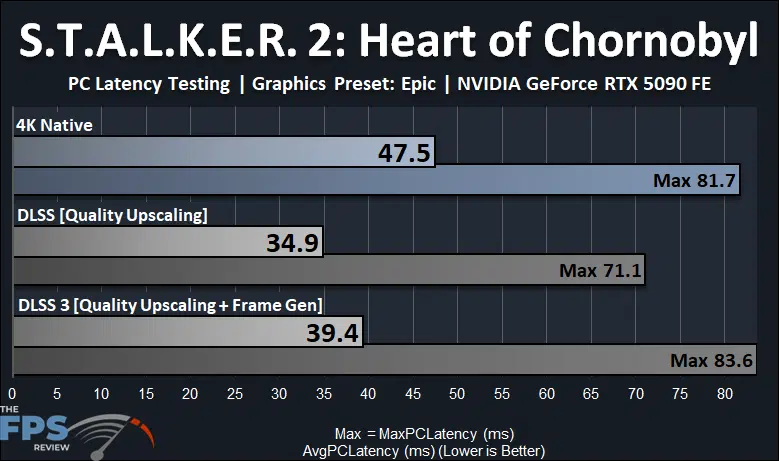
In Stalker 2, we are using the previous generation DLSS 3 here, so this is a good look at DLSS 3 latency on the new NVIDIA GeForce RTX 5090 FE. We can see that at 4K native resolution the RTX 5090 has a pretty high latency in this game at 47.5ms, and a max of 81ms, this game certainly has some latency issues, it isn’t the smoothest game, this could also be related to it being very CPU-dependent as well. However, enabling DLSS Upscaling really improves the latency quite a bit, down to 35ms average and a max of 71ms, so the experience is much smoother.
When we enable Frame Generation the average increases a bit, but still remains under the 4K native performance, except for the maximum. It’s really the maximum latency that’s the kicker here, it maxes out a bit higher than the 4K native latency, which was already not the greatest for this game. That means Frame Gen adds to the latency, and the experience is compromised.
Discussion (19 replies)
Join Discussion →A lot to unpack indeed. I'll be re-reading this review a few times, at least. Thanks @Brent_Justice !
Me too, me too, it's a long one boys! I attempted to include some relevant topics and testing, considering the new technologies. It's just the tip of the iceberg on potential testing. Frame Generation is one of the hardest things to convey.
Nice review I love it . THANK YOU!
Seems to be getting the 9950x3d will be wise for this one... It's been a long time since we've seen a new video card need more than the current gaming champ CPU can push.
Were you all seeing utilization less than 100% in the video card when you called that out?
Is reflex enabled on the native 4k latency tests? they seem quite high.
Except that an AMD exec was quoted a few days ago as saying the performance will more or less be the same. AMD needs to make a CCD with more cores/threads, that or really bump up the clock speeds, or both.
BTW the card kind of looks somewhat small.
That's the magic in their engineering.. It looks like a great card, in that small(ish) footprint..
Do you notice any IQ difference between DLSS4 and DLSS 3? DLSS is supposed to have better IQ
I don't really see a reason it's not somewhat shorter. Pretty much all 3rd party cards I've seen look gargantuan.
Watch the gamers nexus video on the cooling. They are the only source that go's into it and it's actually VERY interesting. That card is engineered very well... from a cooling perspective and density perspective.
Higher density = lower cost because less materials for PCB, but more cost in the cooler itself that was engineered very well by all appearances to be minimal on materials to effectiveness. So in effect they spent a lot to engineer the board but it will pay off in dividends on production costs needing less materials. :)
Really like the angled 12V-2x6 port. Makes so much more sense than previous ports on FE and custom cards.
As much as I want one with an AIO I'm seriously considering this FE version. I normally don't care about FE models but really liking this one. I'll probably still try to get an custom with AIO (MSI more than likely) but feeling tempted by this one.
since nvidia claims the RTX5070 beats the RTX 4090, wouldn't it be fair to claim that the RTX4090 is faster than the RTX5090 (when using dlss 3.5 frame generation vs no frame gen)? :p ;):rolleyes: