
Gameplay Performance – DLSS Frame Gen FPS
*Take Note* – DLSS Frame Generation is a smoothing technology, similar to a more advanced motion blur in effect. Though we are showing the “FPS” Frames Per Second, on these graphs, the FPS of Frame Generation does not indicate performance. Frame-generated frames are not being rendered through the game engine pipeline, they are removed from that pipeline, and thus lack game engine input and responsiveness, thus you are getting a smoothing benefit, but not a performance one in the traditional sense.
Our goal in showing these results is to see the actual framerate improvement Frame Gen can provide, in terms of frames being displayed, so that we can see what DLSS 4 is actually doing compared to the previous Frame Generation. The benefit of more “frames” is better smoothing and fluidity, not responsiveness. To look at Frame Generation performance, check the previous pages where we focused on the PC Latency of Frame Generation.
Alan Wake 2
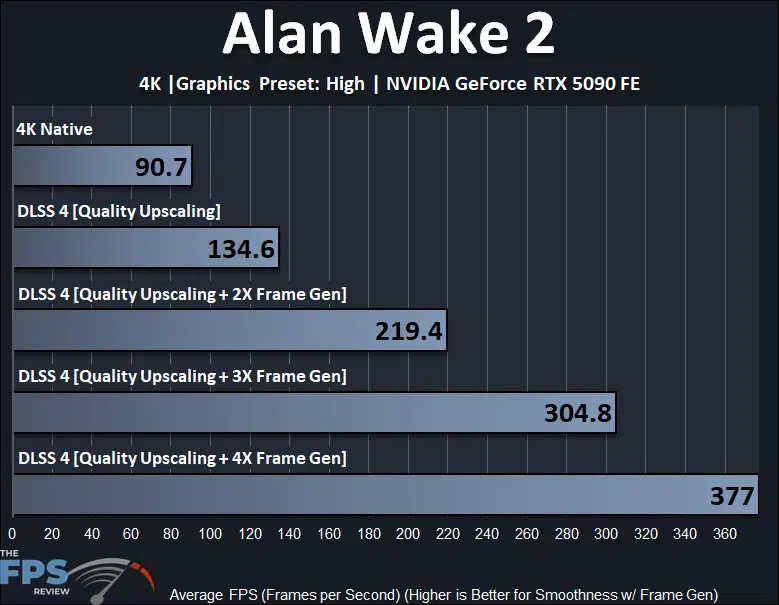
In Alan Wake 2, we have DLSS 4 enabled for this game, we can see the performance increase turning on DLSS 4 Upscaling provides over 4K Native, a 48% improvement making this game very playable at 4K with the highest settings. Beyond that, when we enable 2X Frame Gen, 3X and 4X Multi-Frame Gen, the FPS number does go up, so smoothing is increased. We see a 63% smoothing increase with 2X Frame Gen compared to Upscaling, and another 39% with 3X Frame Gen, and then finally another 24% with 4X Frame Gen. From this, we can see diminishing returns on smoothness improvements the higher up in Multi-Frame Gen we go.
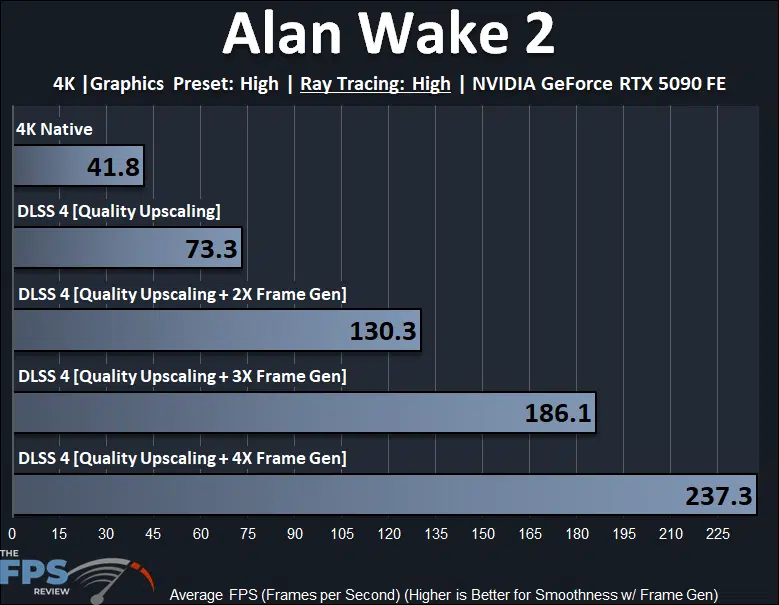
In this graph, we have enabled “High” Ray Tracing at 4K, which stresses the base framerate quite a bit. Turning on DLSS 4 Upscaling improves the game to playable levels and is a 75% performance improvement. When we enable 2X Frame Gen the smoothness increases by 78%, then 3X increases another 43%, and finally 4X by another 28%. Again, we see diminishing returns the more Frame Generation increases in levels.
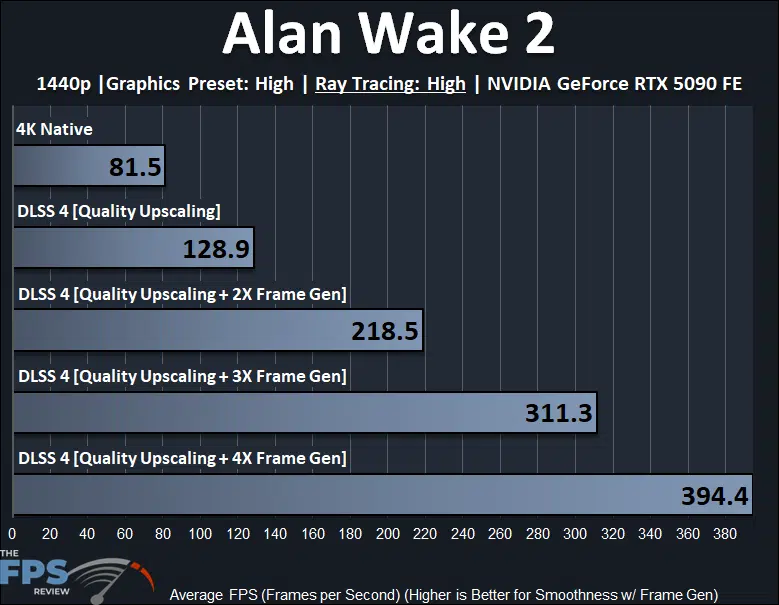
In Alan Wake 2 at 1440p with Ray Tracing, the game is already playable at native resolution, but turning on DLSS Upscaling improves performance by 58%. When we enable 2X Frame Gen smoothness improves by 70%, and at 3X smoothness improves by 42%, and finally 4X improves smoothness by 27%. Once again, the higher up in Frame Gen you go, the less it impacts the smoothness or fluidity.
Black Myth: Wukong
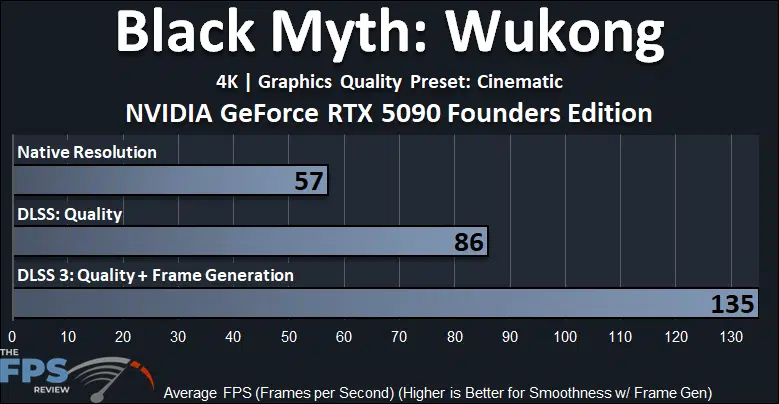
In Black Myth: Wukong, at 4K Cinematic quality the game is quite demanding, so turning on DLSS Upscaling really improves the experience by 51%. When we turn on Frame Generation, the smoothness increases by 57%.
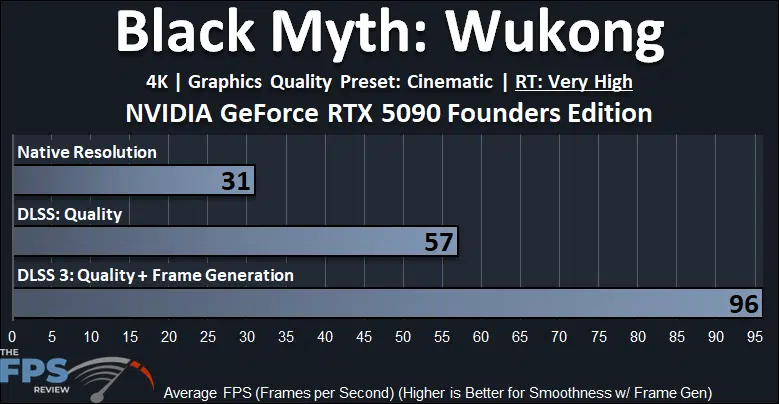
At 4K, with “Very High” Ray Tracing enabled and Cinematic quality this game is not playable without Upscaling. Thankfully Upscaling adds 84% more performance. When we enable Frame Generation smoothness increases 68%.
Cyberpunk 2077
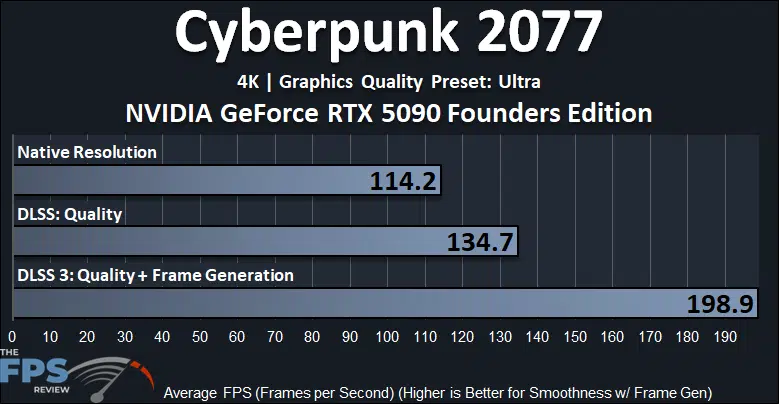
In Cyberpunk 2077 at 4K and Ultra settings, DLSS Upscaling improves performance by 18%. Turning on Frame Generation improves smoothness by 48%.
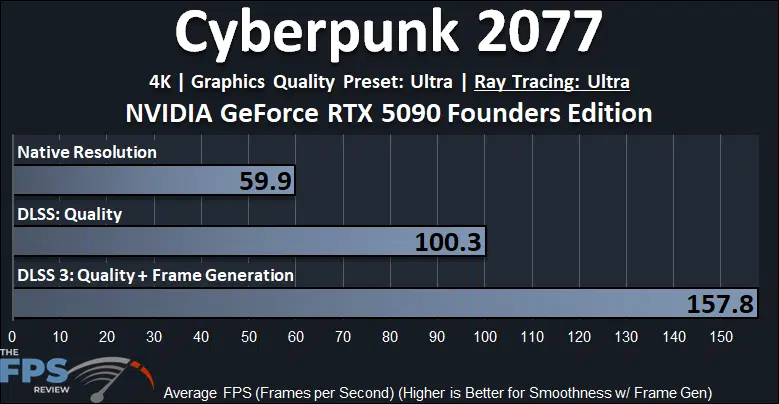
When we turn on Ray Tracing at 4K DLSS Upscaling helps a whole lot, and performance increases by 67%. When we enable Frame Generation smoothness improves by 57%.
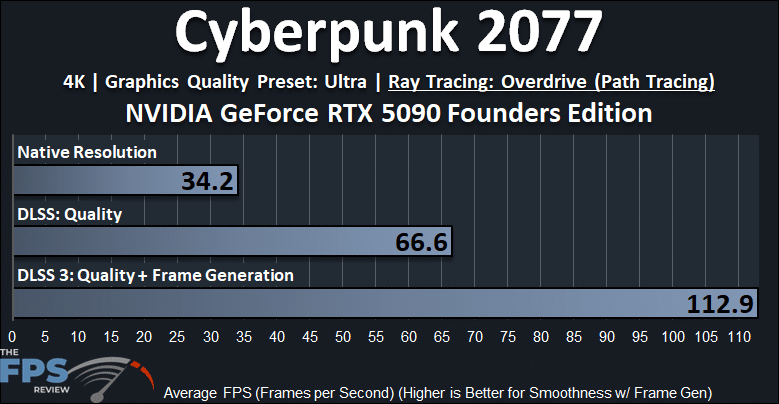
When we turn RT Overdrive (Path Tracing) on at 4K, this game is only playable with DLSS Upscaling. DLSS Upscaling improves performance by a whopping 95%. When we enable Frame Generation smoothness increases by 70%.
Dying Light 2
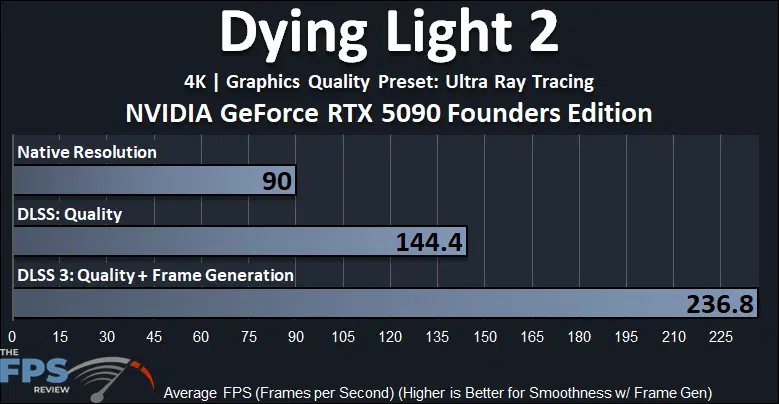
In Dying Light 2 enabling DLSS Upscaling improves performance by 60%. When we enable Frame Generation smoothness improves by 64%.
F1 24
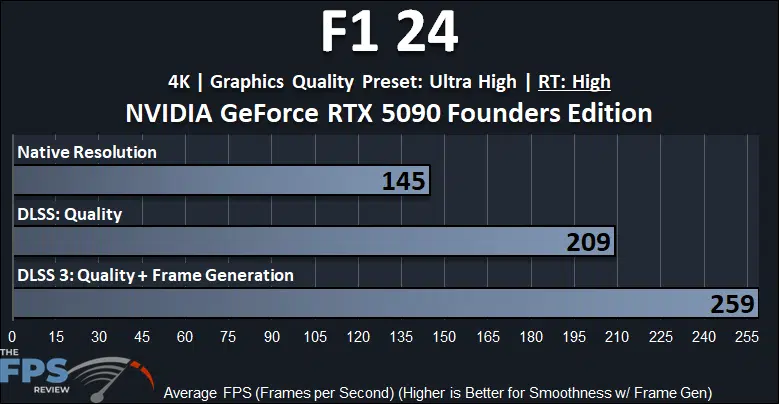
In F1 24 DLSS Upscaling improves performance by 44%. When we enable Frame Generation smoothness improves by 24%.
Horizon Forbidden West
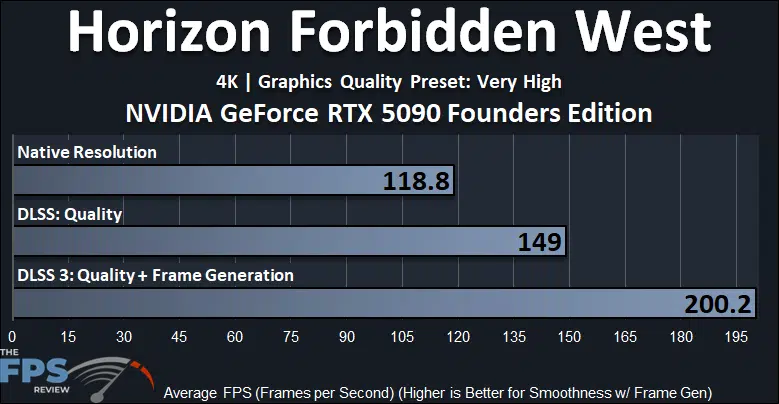
In Horizon Forbidden West DLSS Upscaling improves performance by 25%. When we enable Frame Generation smoothness improves by 34%.
Indiana Jones and the Great Circle
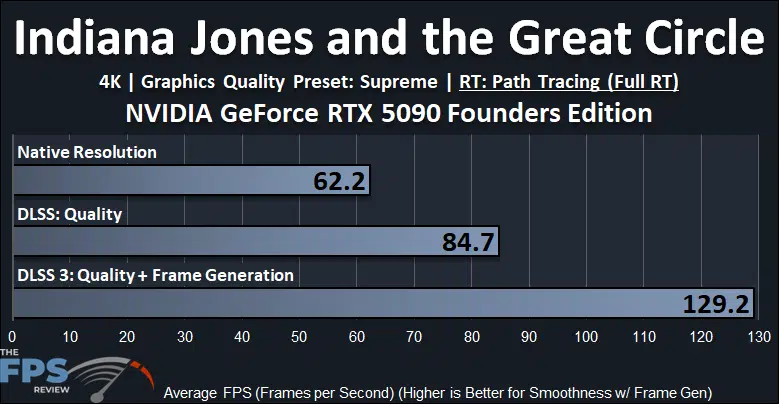
In Indiana Jones when we enable DLSS Upscaling performance improves by 36%. When we enable Frame Generation smoothness improves by 53%.
S.T.A.L.K.E.R. 2: Heart of Chornobyl
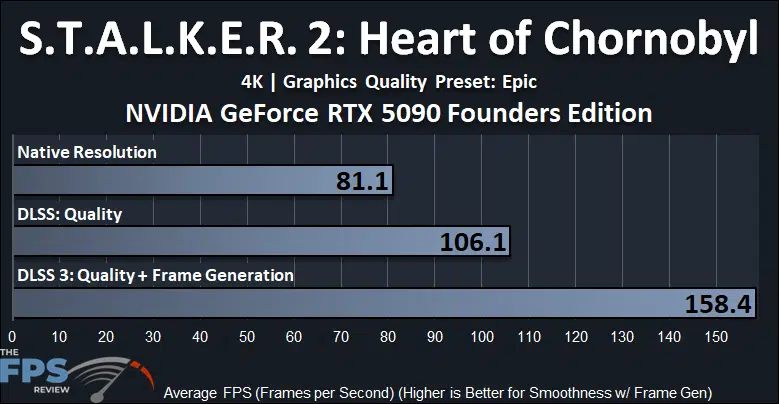
In Stalker 2, when we enable DLSS Upscaling performance improves by 31%. When we enable Frame Generation smoothness improves by 49%.
Discussion (19 replies)
Join Discussion →A lot to unpack indeed. I'll be re-reading this review a few times, at least. Thanks @Brent_Justice !
Me too, me too, it's a long one boys! I attempted to include some relevant topics and testing, considering the new technologies. It's just the tip of the iceberg on potential testing. Frame Generation is one of the hardest things to convey.
Nice review I love it . THANK YOU!
Seems to be getting the 9950x3d will be wise for this one... It's been a long time since we've seen a new video card need more than the current gaming champ CPU can push.
Were you all seeing utilization less than 100% in the video card when you called that out?
Is reflex enabled on the native 4k latency tests? they seem quite high.
Except that an AMD exec was quoted a few days ago as saying the performance will more or less be the same. AMD needs to make a CCD with more cores/threads, that or really bump up the clock speeds, or both.
BTW the card kind of looks somewhat small.
That's the magic in their engineering.. It looks like a great card, in that small(ish) footprint..
Do you notice any IQ difference between DLSS4 and DLSS 3? DLSS is supposed to have better IQ
I don't really see a reason it's not somewhat shorter. Pretty much all 3rd party cards I've seen look gargantuan.
Watch the gamers nexus video on the cooling. They are the only source that go's into it and it's actually VERY interesting. That card is engineered very well... from a cooling perspective and density perspective.
Higher density = lower cost because less materials for PCB, but more cost in the cooler itself that was engineered very well by all appearances to be minimal on materials to effectiveness. So in effect they spent a lot to engineer the board but it will pay off in dividends on production costs needing less materials. :)
Really like the angled 12V-2x6 port. Makes so much more sense than previous ports on FE and custom cards.
As much as I want one with an AIO I'm seriously considering this FE version. I normally don't care about FE models but really liking this one. I'll probably still try to get an custom with AIO (MSI more than likely) but feeling tempted by this one.
since nvidia claims the RTX5070 beats the RTX 4090, wouldn't it be fair to claim that the RTX4090 is faster than the RTX5090 (when using dlss 3.5 frame generation vs no frame gen)? :p ;):rolleyes: