
Power – Temp – Clock Frequency
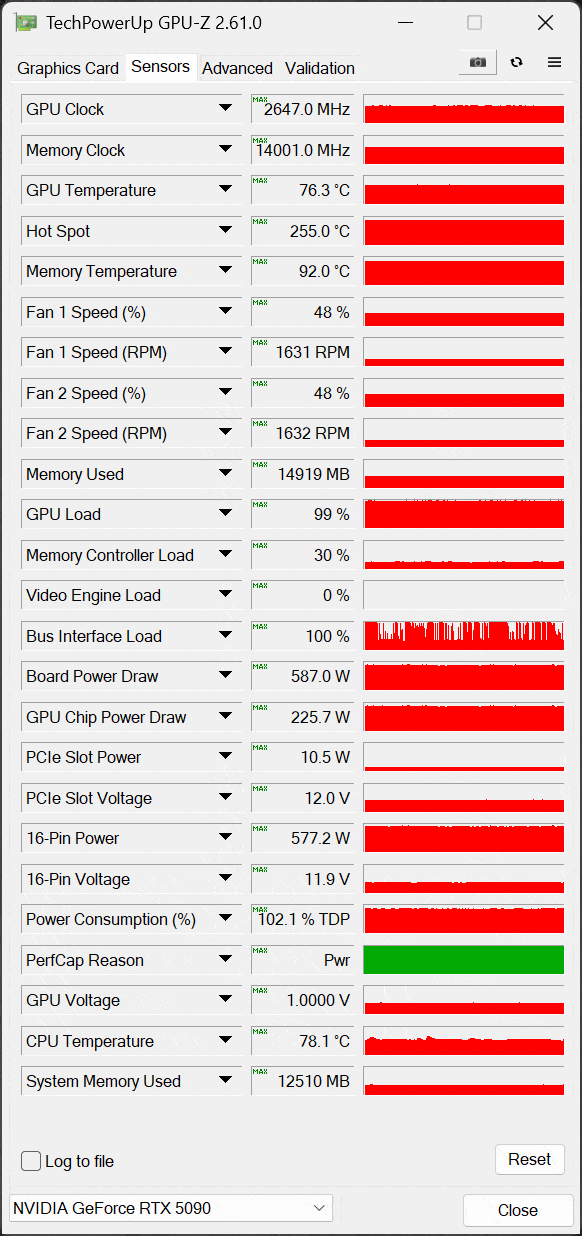
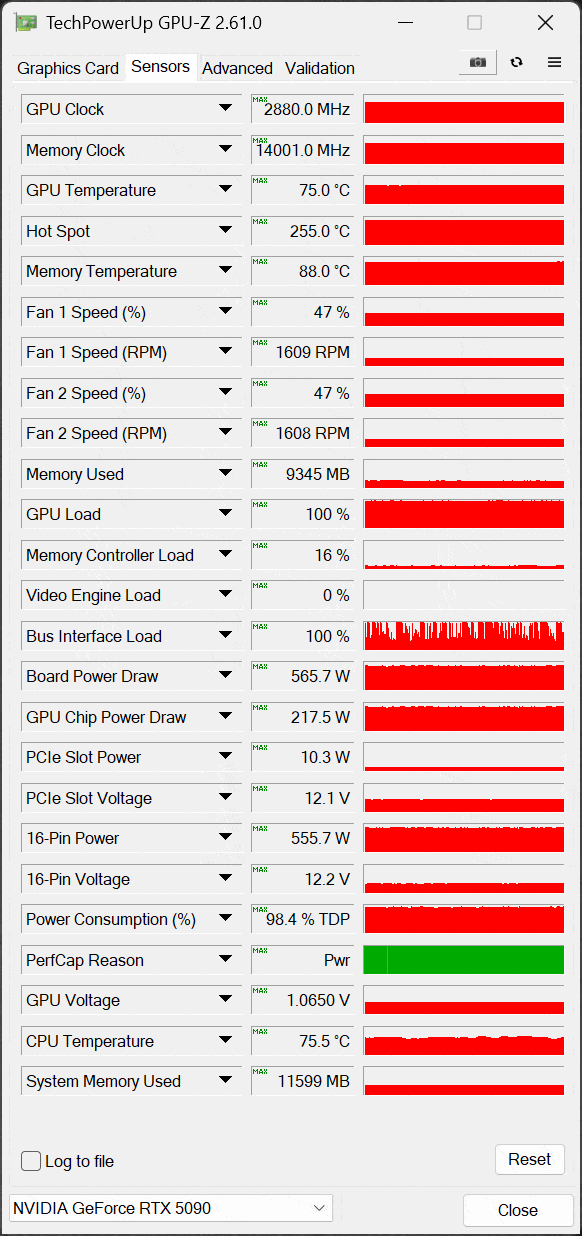
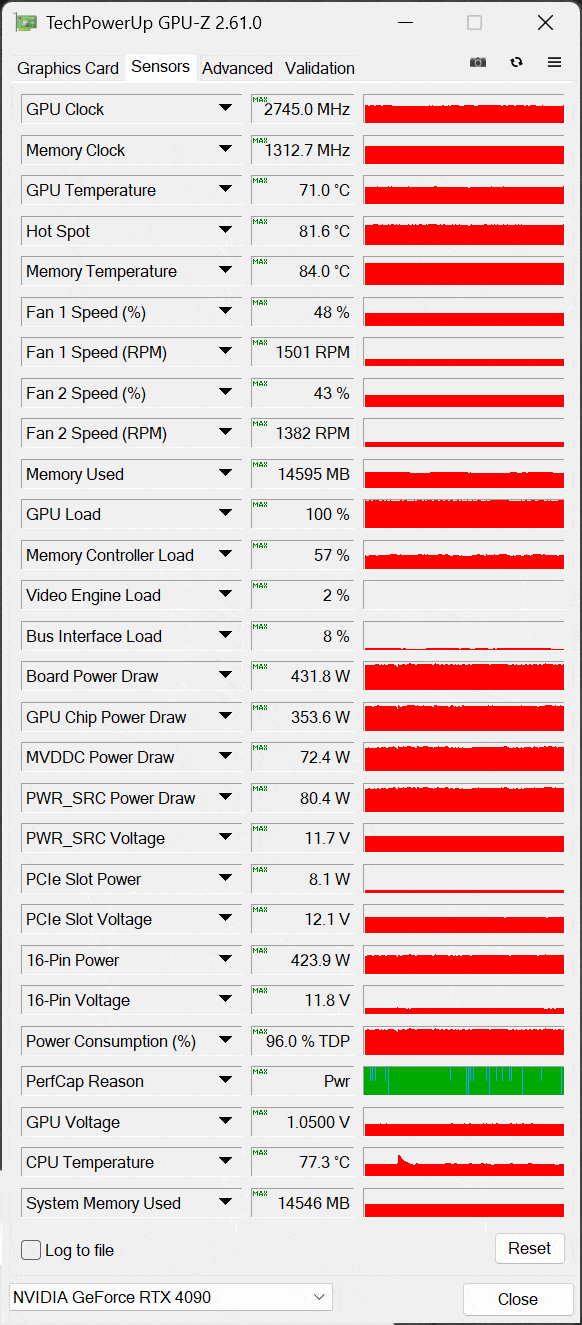
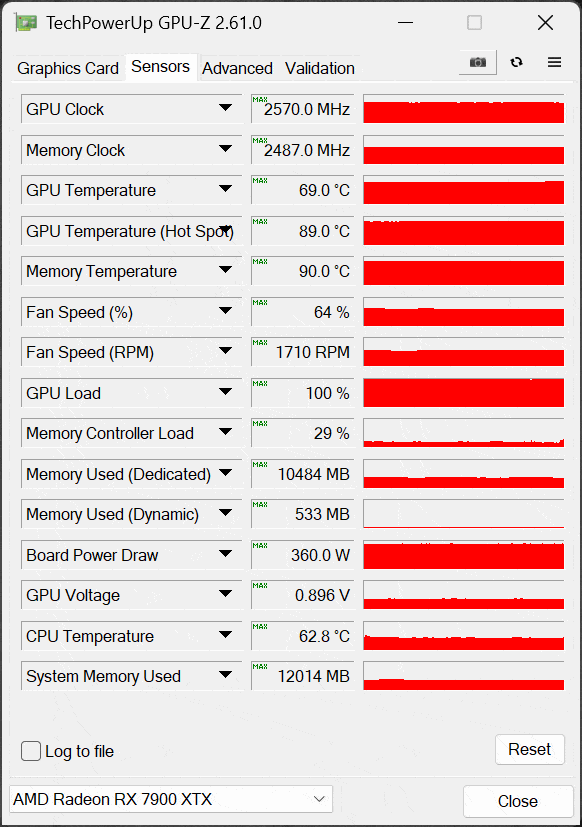
On this page, we will look at the power, temperature, and GPU clock frequency that the NVIDIA GeForce RTX 5090 Founders Edition runs at. We will utilize both GPU-Z and HWiNFO64 to collect data and look at the sensor information they both provide. Note that the GPU-Z version used doesn’t officially recognize the GPU, but most of the data looks correct, except for the Hot Spot temperature which it and HWiNFO64 are reading incorrectly. We will show our results in graphs, and we will also post the screenshots from GPU-Z and HWiNFO64 so that you can see all the data yourself and make comparisons. We collected the data running Cyberpunk 2077 at 4K and “Ultra” settings on all video cards. In the case of the GeForce RTX 4090 and GeForce RTX 5090, we also enabled Ray Tracing at 4K to push the hardware more and test all components of the GPU. If we did not, the full power utilization of the card would not be realized in the testing, it was needed to push the cards hard enough to their full power potential.
Power
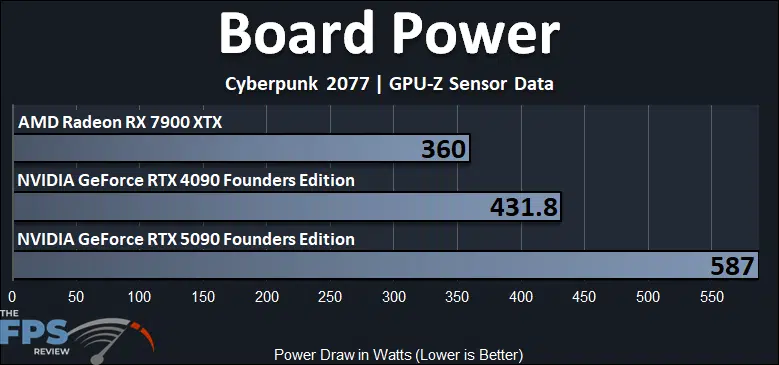
This first graph shows the reading from GPU-Z for Board Power on all three video cards. You can see that the new NVIDIA GeForce RTX 5090 FE consumes the highest power at 587W. The TDP is 575W, so this looks about right, and when you push the GPU it can peak beyond 575W. In GPU-Z you will see it is a few percent over TDP, which shows it correctly. At 587W the GeForce RTX 5090 FE uses 36% more power than the GeForce RTX 4090, or 155W more power. Compared to the Radeon RX 7900 XTX, the GeForce RTX 5090 uses 63% more power.
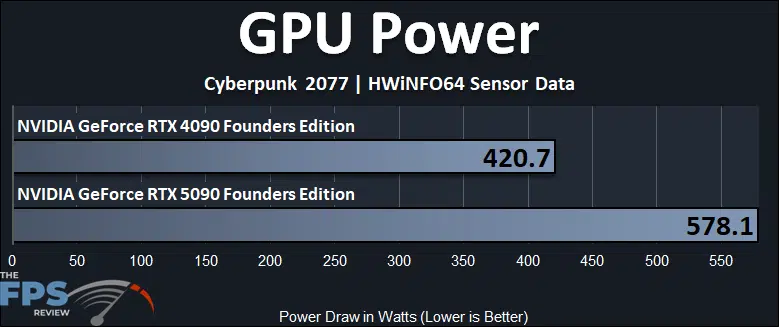
The GPU Power reading above is taken from HWiNFO64 and reports the GPU Power from that sensor. In this, we see the GeForce RTX 5090 again at the highest of 578W, and that makes it use 37% more power than the GeForce RTX 4090 FE.
Temperature
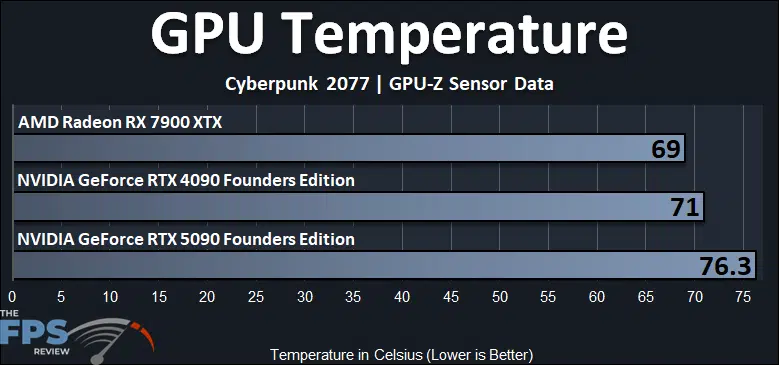
In the graph above we are looking at the GPU Temperature, also known as the Edge temperature. The hottest running GPU is the NVIDIA GeForce RTX 5090 at 76.3c, which is 7% hotter than the GeForce RTX 4090, or 5 degrees hotter. Compared to the Radeon RX 7900 XTX the GeForce RTX 5090 FE is 11% hotter, or 7 degrees hotter.
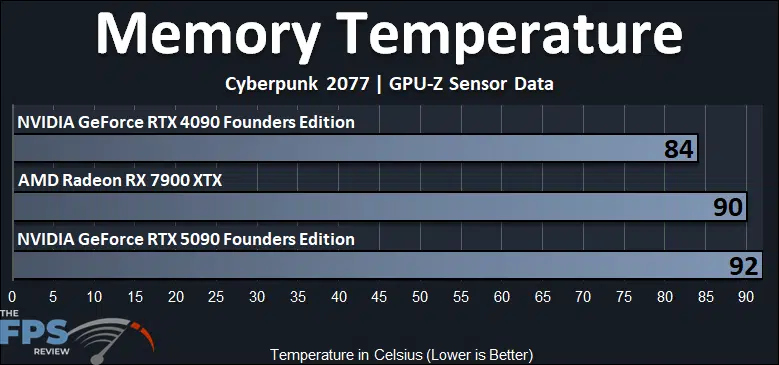
We also wanted to show the memory temperature as reported, which does show the GeForce RTX 5090 FE at 92c, and it is the hottest running memory. The GeForce RTX 4090 was quite a bit cooler running on the memory temperature, by comparison. The GeForce RTX 5090 FE has 10% hotter memory, or 8 degrees hotter. Compared to previous generations, the GeForce RTX 40 series seemed to have cooler running memory, while the GeForce RTX 30 series seemed to have hotter memory around 90c as well. Therefore, the GeForce RTX 5090 FE takes us back to the hotter-running RTX 30 series memory cards.
GPU Clock Frequency
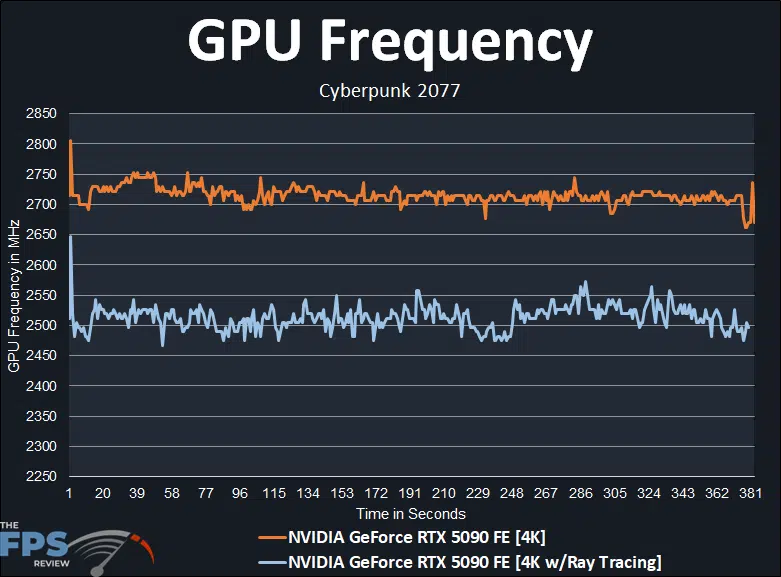
We are showing two different runs in Cyberpunk 2077 above, in one we have the game set at Native resolution 4K raster performance at Ultra settings. In the other, we have simply enabled Ray Tracing at 4K, which puts a greater burden on the GPU, but also seems to affect the clock speed in a negative way as well, as it burdens the GPU more, so we wanted to show both settings in the game so you can see what we see. We discovered that the clock speed can vary quite a bit depending on the game, the resolution, and game settings. We pretty much saw a spread of clock speed between these two extremes, in all the games, the clock speed always fell somewhere between these for the minimum, and maximum, while gaming.
The NVIDIA GeForce RTX 5090 Founders Edition has a Base Clock of 2017MHz and a Boost Clock of 2407MHz. When the card boosts up, at its worst, with 4K and Ray Tracing enabled, it seems to hover around the 2500MHz frequency mark, bouncing between the upper 2450’s, up to 2550MHz at its lowest. The average of the result above is 2513MHz.
Then, when we disable Ray Tracing, and let the GPU run un-burdened, it seems that it can in fact boost higher, all the way up to 2700MHz-2750MHz while gaming. The exact average of that result above is 2715MHz. We also saw a lot of games that averaged closer to around 2600MHz range of frequencies while gaming. Therefore, in all circumstances, it is boosting beyond the rated Boost Clock, which is good to see, it isn’t throttling and does perform better than the Boost Clock. However, just barely, in some settings, and then much higher with other settings in games. It is going to vary between game and game settings, is the GPU more or less burdened, and that will determine the maximum boost clock speed on the Founders Edition design.
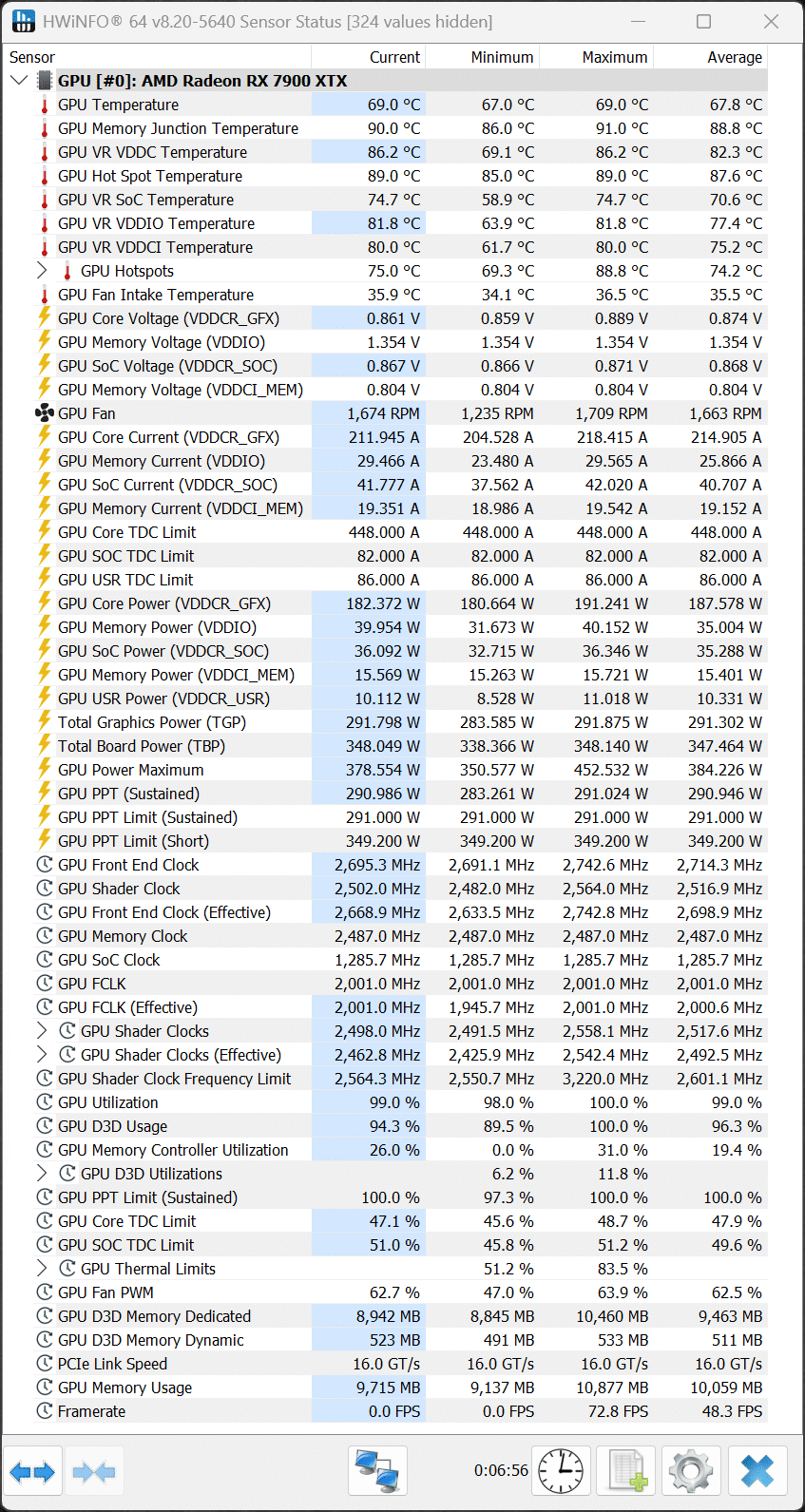
HWiNFO64 Screenshots
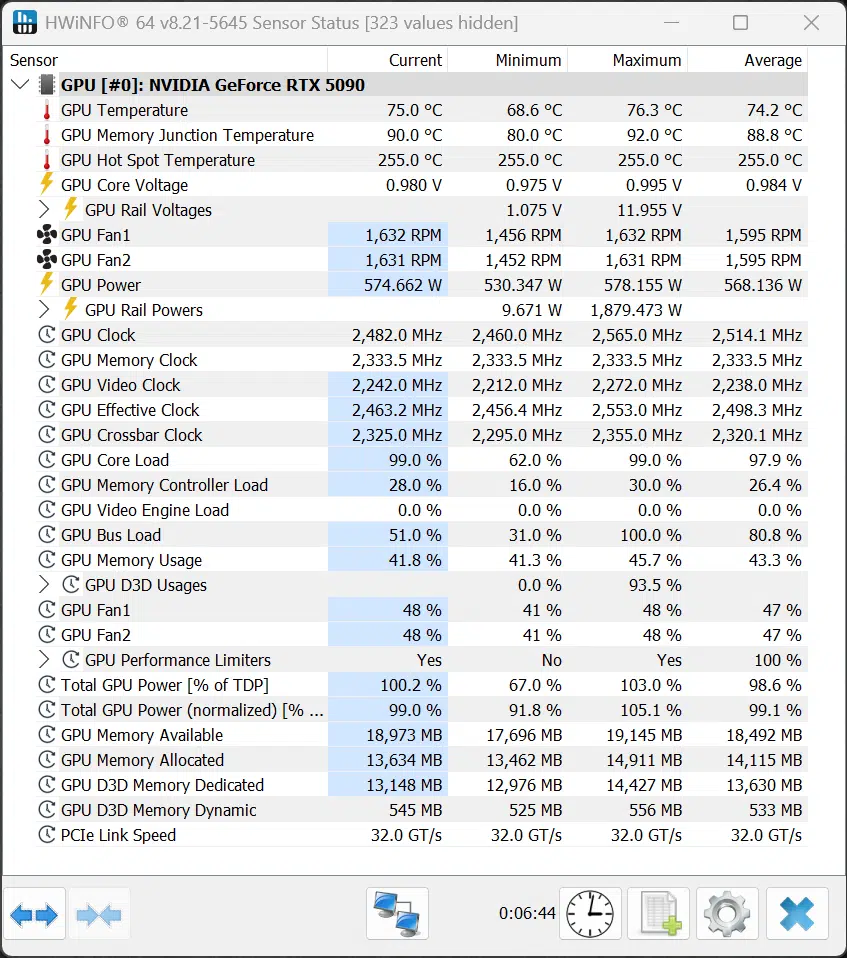
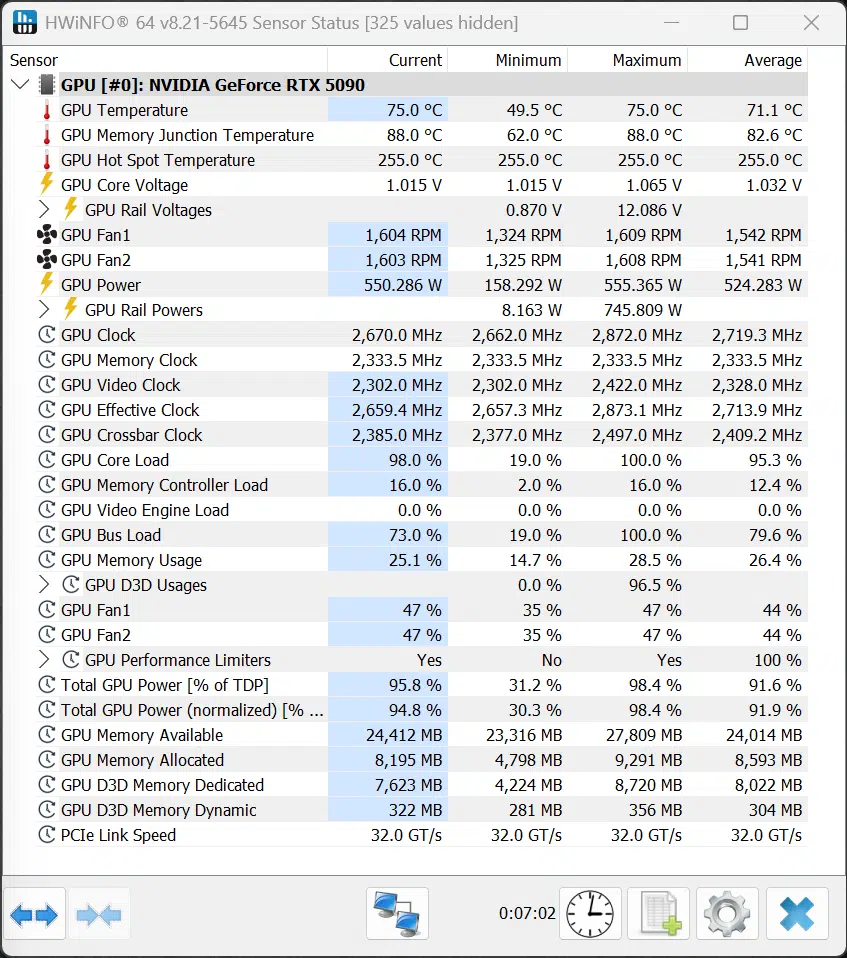
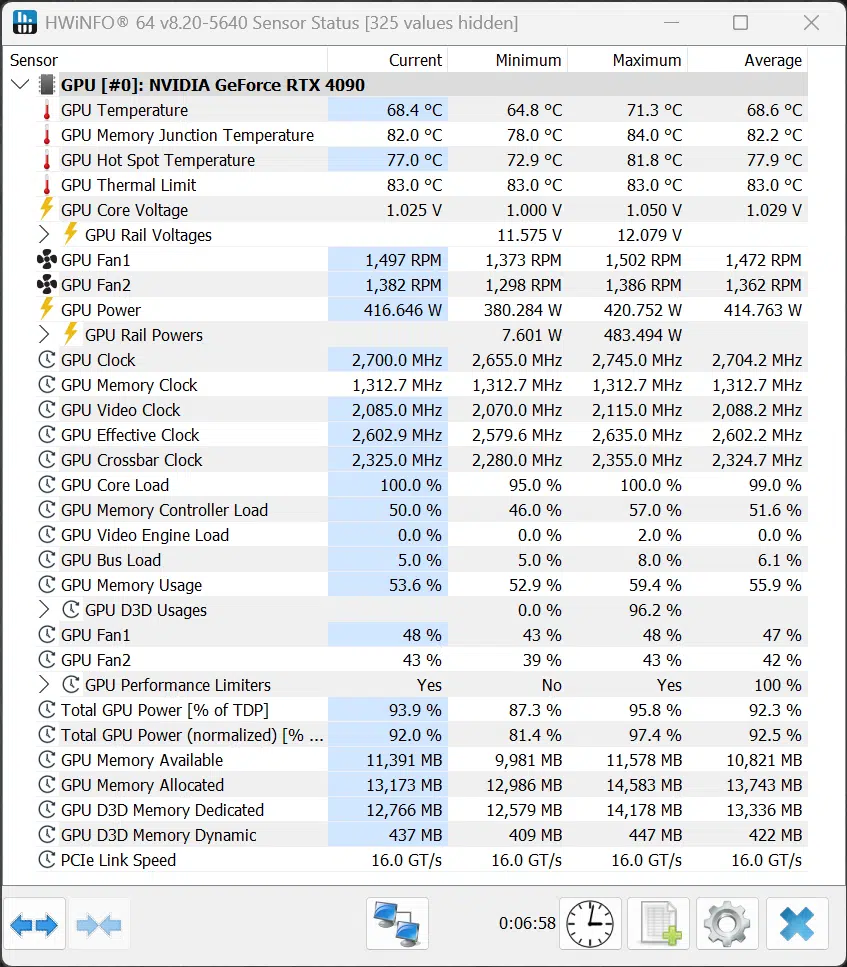
Below, we will post all of our HWiNFO64 Screenshots so you can compare and see for yourselves all of the power and temp data we have. The Hot Spot temperature reading is incorrect, it is not reading that right, the value is maxed out at 255c, so that is wrong.
GPU-Z Screenshots
Below, we will post all of our GPU-Z Screenshots so you can compare and see for yourselves all of the power and temp data we have. The Hot Spot temperature reading is incorrect, it is not reading that right, the value is maxed out at 255c, so that is wrong.
Discussion (19 replies)
Join Discussion →A lot to unpack indeed. I'll be re-reading this review a few times, at least. Thanks @Brent_Justice !
Me too, me too, it's a long one boys! I attempted to include some relevant topics and testing, considering the new technologies. It's just the tip of the iceberg on potential testing. Frame Generation is one of the hardest things to convey.
Nice review I love it . THANK YOU!
Seems to be getting the 9950x3d will be wise for this one... It's been a long time since we've seen a new video card need more than the current gaming champ CPU can push.
Were you all seeing utilization less than 100% in the video card when you called that out?
Is reflex enabled on the native 4k latency tests? they seem quite high.
Except that an AMD exec was quoted a few days ago as saying the performance will more or less be the same. AMD needs to make a CCD with more cores/threads, that or really bump up the clock speeds, or both.
BTW the card kind of looks somewhat small.
That's the magic in their engineering.. It looks like a great card, in that small(ish) footprint..
Do you notice any IQ difference between DLSS4 and DLSS 3? DLSS is supposed to have better IQ
I don't really see a reason it's not somewhat shorter. Pretty much all 3rd party cards I've seen look gargantuan.
Watch the gamers nexus video on the cooling. They are the only source that go's into it and it's actually VERY interesting. That card is engineered very well... from a cooling perspective and density perspective.
Higher density = lower cost because less materials for PCB, but more cost in the cooler itself that was engineered very well by all appearances to be minimal on materials to effectiveness. So in effect they spent a lot to engineer the board but it will pay off in dividends on production costs needing less materials. :)
Really like the angled 12V-2x6 port. Makes so much more sense than previous ports on FE and custom cards.
As much as I want one with an AIO I'm seriously considering this FE version. I normally don't care about FE models but really liking this one. I'll probably still try to get an custom with AIO (MSI more than likely) but feeling tempted by this one.
since nvidia claims the RTX5070 beats the RTX 4090, wouldn't it be fair to claim that the RTX4090 is faster than the RTX5090 (when using dlss 3.5 frame generation vs no frame gen)? :p ;):rolleyes: