
Test Setup
Please read our SSD Storage Review Format and Methodology article for an explanation of our test system, procedures, and goals for SSD reviews.
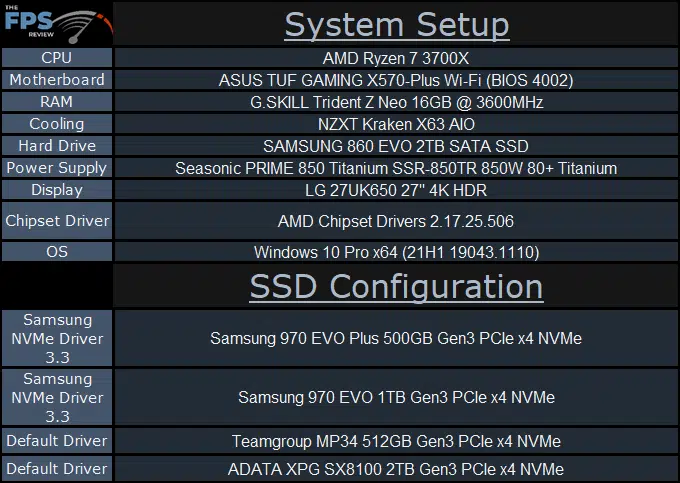
System Setup
We are using the motherboard default BIOS settings. We have DOCP enabled. We are running the latest motherboard BIOS. We have Windows 10 Pro configured to run in the “High Performance” power profile. Windows has the latest updates. NVMe drivers are installed if present on the manufacturer’s webpage.
Note for SSD comparison in this review, we will be making comparisons to the original Samsung 970 EVO SSD, but we are using the 1TB model. Here is how the rated read and write speeds compare: 970 EVO 3400MB/s Read, 2500MB/s Write, and 970 EVO Plus 3500MB/s Read, 3200MB/s Write.
Therefore, in our comparison setup, the 970 EVO Plus has a slightly higher read, and a much higher write speed compared.