
Gameplay Performance at 4K with Ray Tracing
On this page, we are going to focus on 4K with Ray Tracing gameplay performance with the ASUS TUF Gaming GeForce RTX 4070 Ti OC video card. We will include DLSS and FSR performance on the same graph in the games that are supported. We will use DLSS on NVIDIA GPUs and FSR on AMD GPUs. For video card comparisons we are using a GeForce RTX 3090 Ti FE, GeForce RTX 3090 FE, GeForce RTX 3070 Ti FE, and Radeon RX 7900 XT.
F1 2022
F1 2022 was released on June 28th, 2022 on the PC and uses Codemasters Ego engine. The game supports Ray Tracing, DLSS, AMD FidelityFX, and FSR. We are going to run the game with the highest quality settings of “Ultra High” and TAA+FidelityFX. We will enable all Ray Tracing options in the game to “On.” We will enable DLSS and FSR as needed at the Quality setting for both. We will utilize the built-in benchmark in the Imola track, in dry conditions with a far-chasing cam.
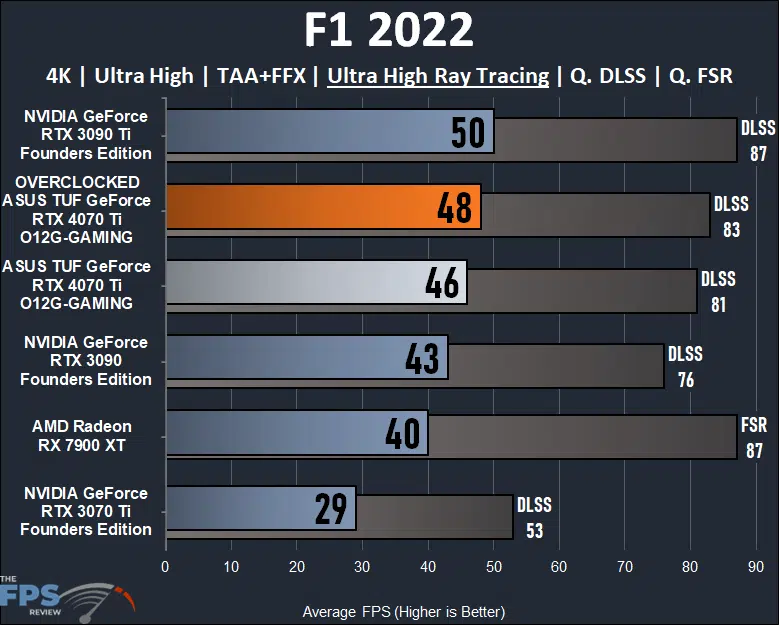
In F1 2022 at 4K with all the Ray Tracing options enabled at “Ultra High” settings, this game is not playable on the ASUS TUF Gaming GeForce RTX 4070 Ti OC video card at 46FPS. Compared to the GeForce RTX 3070 Ti it offers a 59% performance uplift. With Ray Tracing enabled at 4K the ASUS TUF RTX 4070 Ti OC sits above the RTX 4090 in performance, but below the RTX 3090 Ti. It is 7% faster than the RTX 3090 but 8% slower than the RTX 3090 Ti. It is, however, 15% faster than the AMD Radeon RX 7900 XT with Ray Tracing.
Overclocking the video card improves performance by 4%. This does not change the positioning of the video card, but it is closer to the RTX 3090 Ti in performance now. What makes this game playable is DLSS or FSR. With upscaling, the ASUS TUF RTX 4070 Ti OC gets a huge 76% performance improvement, and the game is very playable at 81FPS at 4K with Ray Tracing. The AMD Radeon RX 7900 XT also gets a huge improvement using FSR in this game, a larger 118% performance improvement taking it to 87FPS. At 87FPS the Radeon RX 7900 XT is outperforming the ASUS TUF Gaming GeForce RTX 4070 Ti OC, even overclocked, and that’s all with Ray Tracing enabled at 4K.
Dying Light 2
Dying Light 2 was released in February 2022 on the PC and uses Techland’s C-Engine. The game supports Ray Tracing, DLSS and FSR2. This game supports Ray Tracing environmental effects including Ray Traced Soft Shadows, Ray Traced Ambient Occlusion, Ray Traced Global Illumination, and Ray Traced Reflections. We utilize the built-in preset option to set “HIGH QUALITY RAYTRACING” which enables the games highest graphics settings plus the environmental effects explained above at the highest values. The game is run in DX12 Ultimate mode with ASYNC Compute turned on. We use the built-in benchmark.
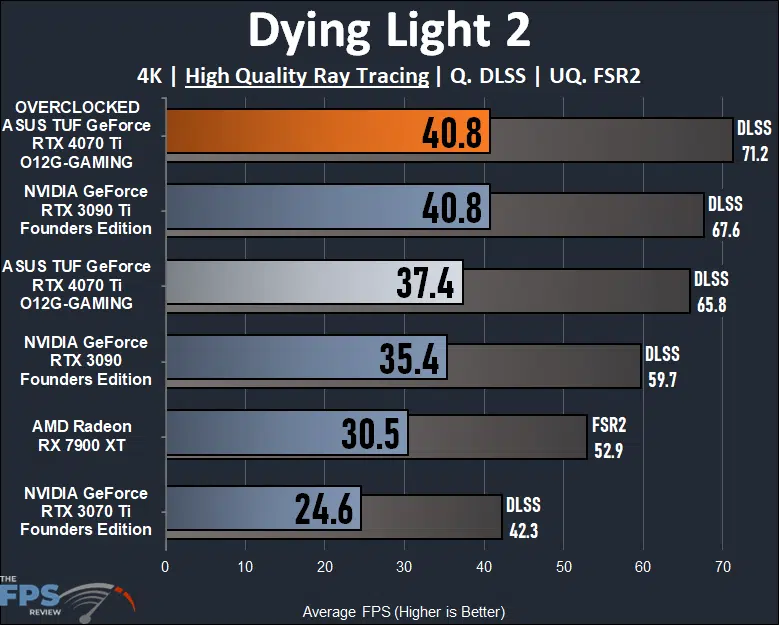
In Dying Light 2 at 4K with the “High Quality” Ray Tracing enabled this game is not playable on the ASUS TUF Gaming GeForce RTX 4070 Ti OC video card at 37.4FPS. None of the video cards are, in fact, until we enable upscaling like DLSS or FSR. The ASUS TUF RTX 4070 Ti OC offers a 52% performance uplift from the GeForce RTX 3070 Ti. We once again find that its performance lies between the RTX 3090 and RTX 3090 Ti. It is 6% faster than the RTX 3090 but 8% slower than the RTX 3090 Ti. It is, however, 23% faster than the Radeon RX 7900 XT.
Overclocking the video card improves performance by 9%, but the game is still unplayable without upscaling. Overclocked, it now matches the RTX 3090 Ti in performance. It does take DLSS to make this game playable at 4K with Ray Tracing. By enabling DLSS performance comes up 76% and the game is very playable averaging above 60FPS at 4K with Ray Tracing. The Radeon RX 7900 XT is still not playable, even with FSR2.
Cyberpunk 2077
Cyberpunk 2077 was released in December of 2020 and uses the REDengine 4. We have the game patched to version 1.61 and use the built-in benchmark. We test using the Graphics Preset option to set graphics settings. We use the Ray Tracing Graphics Preset of either: “Ray Tracing: Low”, or “Ray Tracing: Medium” or “Ray Tracing: Ultra” as indicated. This game supports DLSS and FSR2.
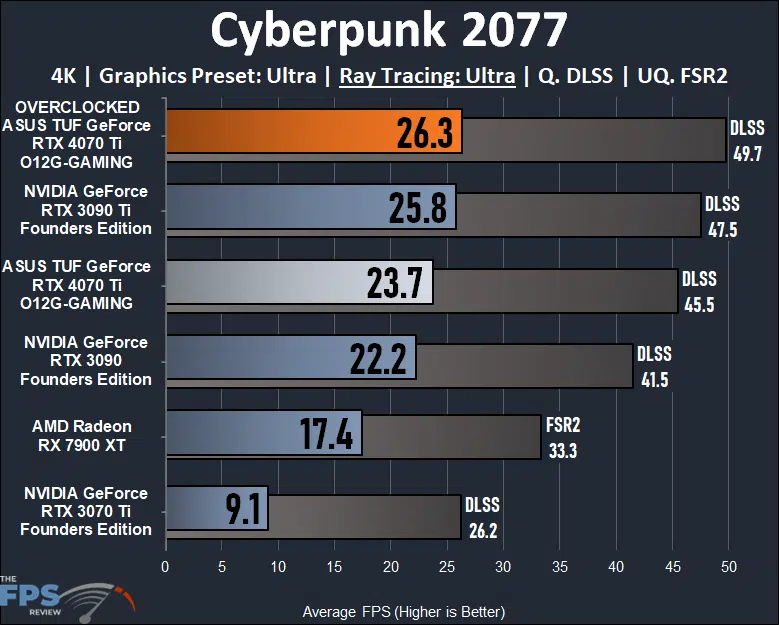
Cyberpunk 2077 at 4K with “Ultra” Ray Tracing is much like Dying Light 2, it is unplayable on every video card here at these settings. In fact, it’s so intense that even with FSR or DLSS no card here can play this game at 4K with “Ultra” Ray Tracing, so you are simply going to have to play at 1440p with this game if you want Ray Tracing on any of these video cards. It’s pointless to talk about the percentage differences with values this unplayable, but we do again see that the ASUS TUF Gaming GeForce RTX 4070 Ti OC is sitting between the RTX 3090 and RTX 3090 Ti in performance.
Watch Dogs Legion
Watch Dogs Legion was released on the PC in October of 2020 and uses the Disrupt game engine. We utilize the built-in benchmark for testing. We have the HD Texture pack installed and enabled for testing. We use the built-in graphics preset of “Ultra” for testing. We utilize the “Ultra” preset quality option for Ray Tracing. This game supports DLSS upscaling.
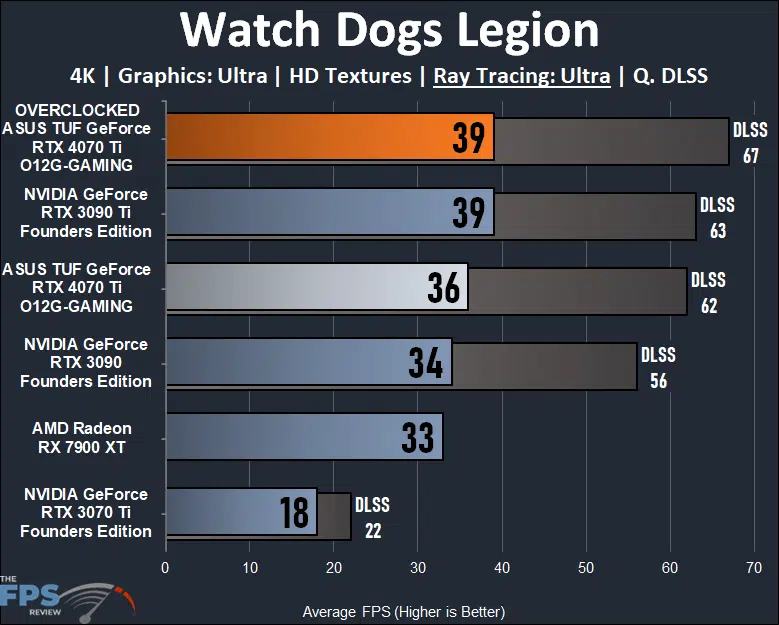
In Watch Dogs Legion at 4K with “Ultra” Ray Tracing we also find this game is unplayable on every video card. However, unlike Cyberpunk, using upscaling DLSS does make it playable on the new ASUS TUF Gaming GeForce RTX 4070 Ti OC video card. With DLSS enabled we get 62FPS, and we find performance between the RTX 3090 and RTX 3090 Ti. Overclocking improves performance and brings it up just a bit more.
Metro Exodus Enhanced
Metro Exodus Enhanced is being run with Shading Quality at “Extreme” and Ray Tracing at “Ultra.” This is a demanding game, that heavily focuses on Ray Tracing utilization, including Global Illumination. We are utilizing the built-in benchmark.
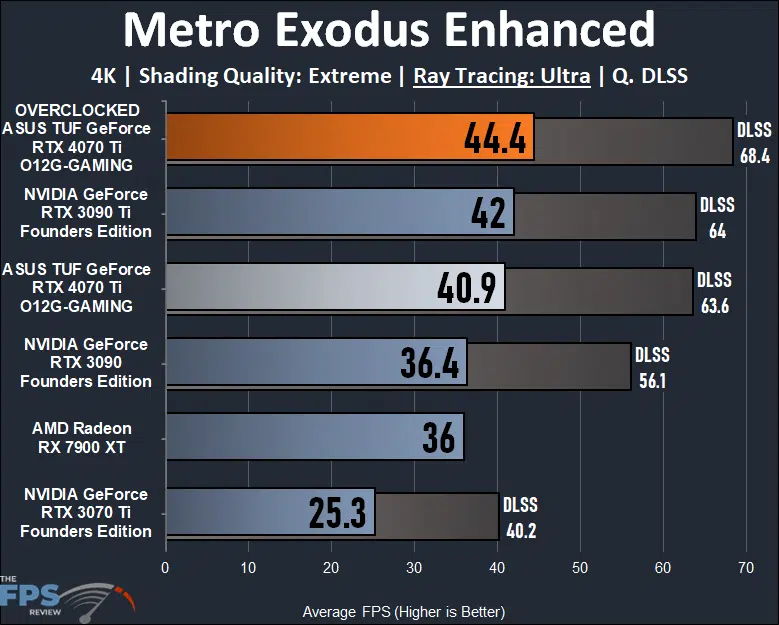
Just like the last three games, Metro Exodus Enhanced is also not playable at 4K with the “Ultra” setting turned on, which uses Ray Tracing. However, it is playable when DLSS is used. With DLSS the ASUS TUF Gaming GeForce RTX 4070 Ti OC is playable at 60FPS and sits between the RTX 3090 and RTX 3090 Ti. Overclocking also makes the performance much better with DLSS.
Discussion (19 replies)
Join Discussion →Aaaand, it's a dud. The 7900 XT now actually makes sense.
Sort of want, but will wait until under 500. 1080ti still gets job done.
Ok, so this is only tangential to the topic... but at what point do you get to call it either a monopoly or price fixing?
Now, I do not think that AMD and nVidia are colluding to raise consumer prices. I think nVidia is doing it because they can get away with it, and AMD is just playing along with "just slightly less than" pricing because their shareholders would oust them outright if they didn't.
There is no government limit on the margin a company can ask, or the profit they can pull in. That's kinda how capitalism works. But I sure hate this feeling that we are just getting utterly taken advantage of. I guess it's just a hobby, I don't have to play along - I just hate seeing it happen before my eyes.
Nvidia has enormous pricing power because of RTX & DLSS3
At the premium price points ($500 plus) people most likely go by added features rather than outright raster performance
What is surprising is that: even in below $500 prev gen GPUs, higher price Ampere cards outsell equivalent but much cheaper RDNA 2 cards
If more people purchase Navi 22 cards (RX 6750 XT, 6700 XT, RX 6700) instead of Ampere, than Nvidia might get the message !!
DLSS3 itself isn't a real selling point. It exists, and it has a purpose - but not for most gaming scenarios. DLSS2 is still the main DLSS technology and remains more competitive overall, especially in situations where RT is used with heavy loads overall.
If nvidia pushes DLSS3 as hard as they pushed DLSS, we'll see support in most upcoming games.
Besides, 100% performance increase does sound like a big selling point.
Thanks, @Brent_Justice for the very thorough review which answered nearly every question I could have about this card.
Well, it seems the card lies between the RTX3090 and 3090Ti, but men the thing gets bandwidh starved at 4k
I'm really impressed just becauese looking at the specs I really didn't think it would do that good.
Great review!
I figured Nvidias "faster than 3090ti" claims were going to be all fluff, but it does at least get close most of the time, and actually succeeds in others.
Still, not quite sure I'd be happy with the value proposition $799 is a lot for a mid range card.
If I could make a request, if it isn't too much of a main in the ass, Minimum/1%/0.1% framerates are very relevant and would add a lot of information to your reviews. I'd even argue that minimum frames are MORE relevant that average frames.
Sure?
DLSS 1.0 was pretty bad - but showed the promise of intelligent upscaling.
DLSS 2.0 has more or less delivered on that promise. My opinion, of course; I find DLSS 2.0 to be more than close enough to justify any perceived degradation in visuals. Granted I have no problem using FSR / FSR 2.0 where exclusively available, whether I'm gaming on an AMD GPU or that's just what the game in question supports.
DLSS 3.0 is 'frame doubling'. This works great for pre-recorded media (if you like the effect itself), but for real-time applications it means that there's a definite insertion of additional input latency attached with usage. So, for DLSS 3.0 to even be useful in a particular situation, performance already has to be high enough for real-time interaction. Whereas DLSS 2.0 taking you from an arbitrary 20FPS to 35FPS, or 60FPS to 90FPS and so on can significantly impact the quality of the experience, DLSS 3.0 (that is, the 'frame generation' part of it) needs you to be running at 60FPS+ in the first place.
And there's a place for that - many games that aren't as user-response dependent can benefit, thinking anything turn-based or perhaps RPG and adventure-style games. Some simulators as well.
But for anything where optimizing for input latency is already a concern, DLSS 3.0 is a non-starter.
No one should be! But it's still the cheapest entry point for the level of technology Nvidia is bringing to the table.
BTW seems to me the cards are unnecessarily big. It seems the PCB is about 2/3 the size of the card.
I wonder if they reused parts from its bigger brothers to save R&D and inventory costs.
It's a tradeoff. It costs more per unit, but it saves having to develop new parts.
Yeah, I'm sure. There are already about 50+ games announced that will support DLSS3. If someone know how to shove new technology down your throat, that's nvidia. BTW thanks to nvidia reflex, latency is actually lower than without DLLS3. Not saying its going to be great, but by now DLSS already gained high praise and is considered a must have for many gamers, DLSS3 at least deserves a chance.
Anyway AMD is also having its own frame interpolation/frame creation technology coming soon. We'll see.
I haven't owned a Nvidia GPU newer than my 2016 Pascal Titan X, so I ahve not personally played with DLSS yet.
Can all titles that support DLSS3 also run DLSS2? In other words is it backwards compatible or an option?
Because I too tend to think - from what I have read and seen, through not through personal experience) that DLSS2 was the pinnacle of the tech.
Pretty sure the answer is yes. Brent has a write-up on it in his 4090 review that also goes a little more in-depth about the frame generation feature. It's about midway down the first page.
https://www.thefpsreview.com/2022/10/11/nvidia-geforce-rtx-4090-founders-edition-review/