
VRAM Dedicated Usage
On this page, we will now look at the Dedicated VRAM usage on the GeForce RTX 5090 and Radeon RX 9070 XT. For this test, we are using a combination of our GPU-oriented and CPU-oriented run-throughs; therefore, this is a much longer run-through in the game. We are running at 4K Native Resolution on the Epic preset and showing the dedicated VRAM usage, not the allocated VRAM, but dedicated.
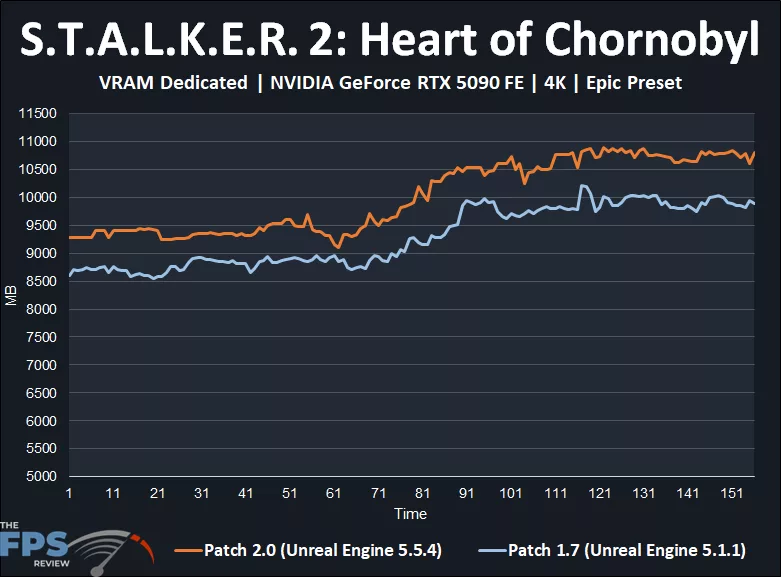
Well, this graph pretty much tells you very clearly some interesting information regarding the patch differences on the GeForce RTX 5090. With Patch 2.0, there is a consistently higher VRAM usage, from the start of the run to the end; the two lines never meet. This means that Patch 2.0 is using more VRAM on the GeForce RTX 5090 at 4K. It seems to peak at near 11GB usage with Patch 2.0, whereas in the previous patch it was maxing out just over 10GB, so about 1GB more VRAM throughout.
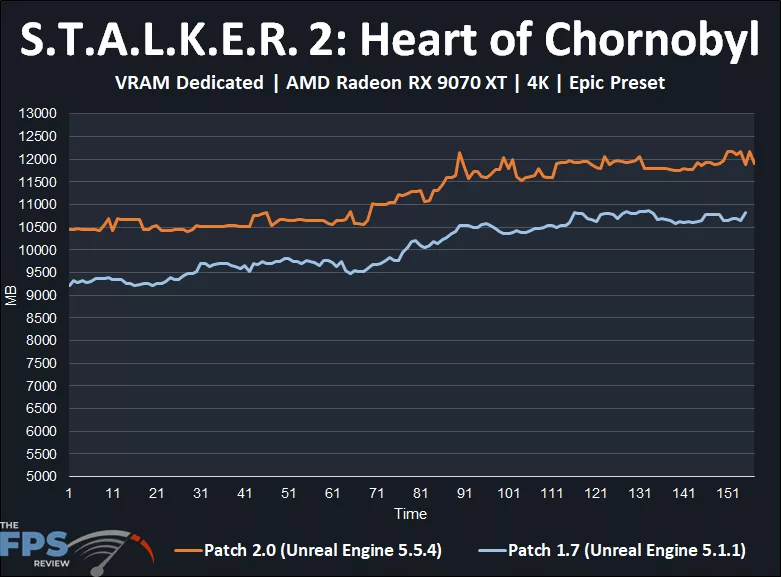
With the Radeon RX 9070 XT, VRAM usage is also higher with Patch 2.0, very consistently. In fact, the Radeon RX 9070 XT seems to consume more VRAM than the GeForce RTX 5090, interestingly. The Radeon RX 9070 XT peaks at over 12GB of VRAM It certainly hugs that 12GB line toward the end, meaning a 12GB video card could be bottlenecked in this game at 4K. The Radeon RX 9070 XT seems to be using about 1.5GB more VRAM with Patch 2.0.
Discussion (1 reply)
Join Discussion →The improvements in this game are quite dramatic. The look of the game is really improved. I've not played enough into it to see about the A-Life changes.
Some comparison screen shots would have been a nice addition to the article.