
Overall GPU Comparison & Game Quality Performance
We’ll start with just a big overall graph showing all the video cards that we tested, compared to each other, so you can see how they scale in performance. Then we will look at how all of the game’s graphics options presets scale in performance. We are using a long manual in-game run-through for testing that takes in every part of the environment.
For the first graph below, we opted to test at 1440p – TSR: Native – Ultra Graphics Preset since we are covering a large scale of performance. We’ll dive into a subset of testing on the following pages and break down graphics feature testing. The second graph will show how the game’s default quality presets compare in performance, so you can see how this game’s quality options scale in performance.
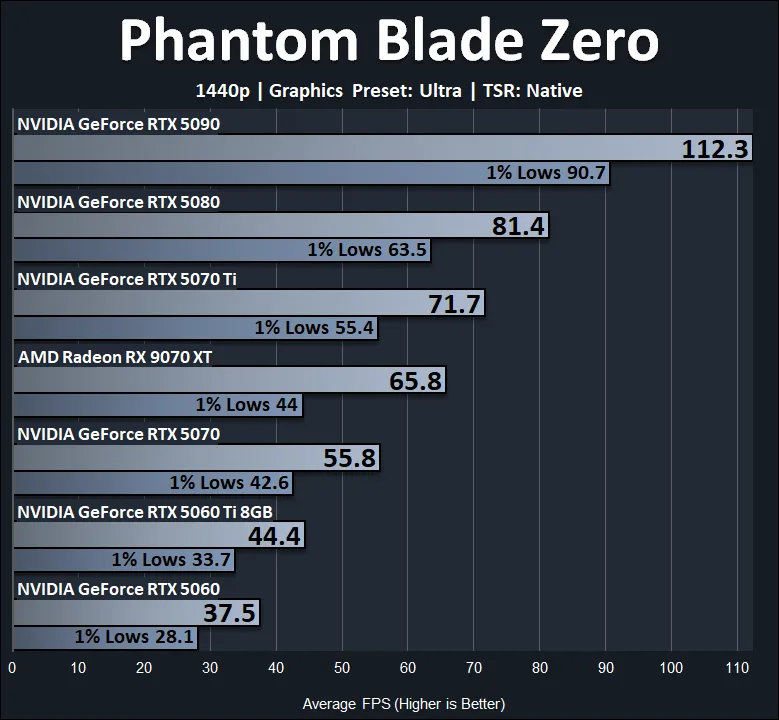
In the graph above, we are testing at 1440p – TSR: Native – Ultra Preset. Regarding the GeForce RTX 5060 Ti, we are using the 8GB version. We thought that model would be more interesting for results, especially given the current state of GPU pricing. The video cards line up as you’d expect. The Radeon RX 9070 XT is a bit slower than the GeForce RTX 5070 Ti in this game. At 1440p, in terms of average FPS, each card is above 60FPS until you get down to the GeForce RTX 5070, it cannot maintain an average of 60FPS average. Everything from the GeForce RTX 5070 and downward is not playable at 1440p – TSR: Native – Ultra.
Looking solely at the 1% Lows, however, if you wanted to stay at 60FPS or above, you are looking at a GeForce RTX 5080 or above. The GeForce RTX 5080 is the first card to hit above 60FPS 1% Lows; everything below it has lower 1% Lows. The Radeo RX 9070 XT sits above 60FPS average, but the 1% Lows are only 44FPS on that video card.
Looking at the scaling between video cards, the difference between the GeForce RTX 5090 and GeForce RTX 5080 is 38%. The difference between the GeForce RTX 5080 and GeForce RTX 5070 Ti is 14%. The difference between the GeForce RTX 5070 Ti and GeForce RTX 5070 is 28%. The difference between the GeForce RTX 5070 and GeForce RTX 5060 Ti 8GB is 26%. The difference between the GeForce RTX 5060 Ti 8GB and GeForce RTX 5060 is 18%.
Game Quality Performance
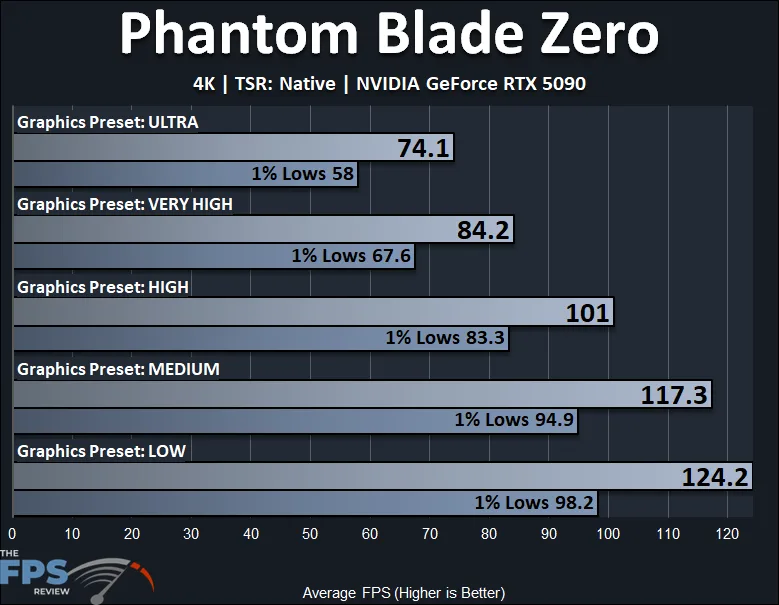
In Phantom Blade Zero, there are game quality presets of “Ultra”, “Very High”, “High”, “Medium”, and “Low.” In the above graph, we are comparing these quality settings on a GeForce RTX 5090 at 4K at TSR: Native. The goal here is to see the scaling between quality settings and how much performance you would gain if you went down a level, percentage-wise.
Starting at “Ultra,” we are getting 74.1FPS average and 1% Lows at 58. At this setting, the game is playable, though the 1% Lows are below 60FPS; this is with TSR: Native at 4K. If we lower the graphics settings down to “Very High,” then performance improves by 14% and is now at 84FPS average, and 1% Lows are above 60FPS. If we further lower the graphics settings to “High,” performance improves by an even greater 20% and is now at 101FPS average and 83.3FPS 1% Lows. Further, moving down to “Medium” improves performance by 16%, and the 1% Lows are now above 90FPS. Finally, moving down to “Low” improves performance by a smaller 6%. From “Ultra” to “Low,” the difference is 68%.
What this tells us is that the scaling is very linear, and the biggest difference is lowering the image quality to the “High” setting. However, between Medium and Low there is a very small difference, and it is not worth the visual quality drop-off. In fact, in terms of visual quality, we found that Low and Medium look quite bad; the game looks flat and unimpressive. It isn’t until you get to the “High” option that certain graphics features turn on and actually look decent. We suggest not dropping below “High” unless you absolutely have to, to enjoy this game.
Discussion
Join Discussion →No replies yet. Be the first to reply on the forum.