
Ray Tracing Performance
Now it is time for the all-important Ray Tracing performance comparisons. We will look at both the traditional Ray Tracing method (with Ray Reconstruction) and Path Tracing. Remember, in the regular Ray Tracing mode, the game uses Lumen GI, while Path Tracing uses ReSTIR GI. We’ll show TSR: Native compared to DLSS Upscaling, compared to Ray Tracing, in TSR: Native compared to Ray Tracing with DLSS Upscaling, compared to Path Tracing with DLSS Upscaling. All quality settings are at “Ultra”. We are using a long manual in-game run-through for testing that takes in every part of the environment.
NVIDIA GeForce RTX 5090
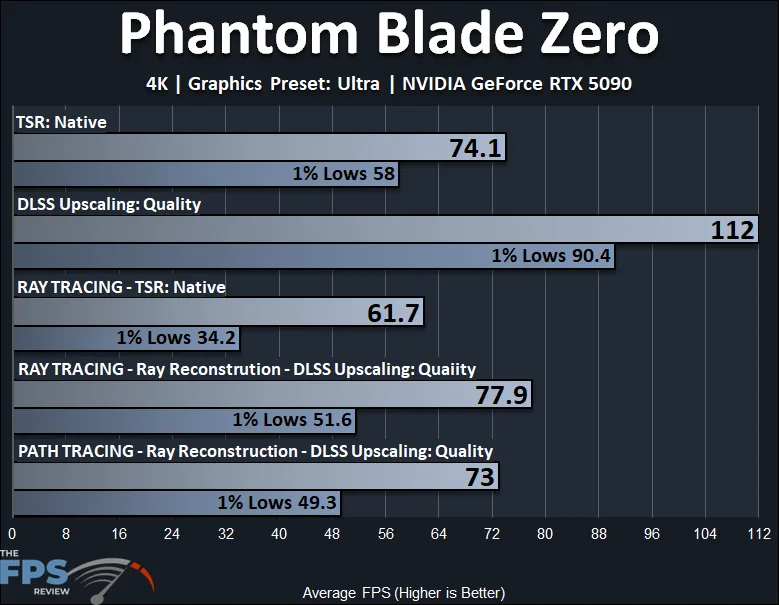
Starting with the NVIDIA GeForce RTX 5090, we are running the game at 4K. You can see that the game is at 74FPS at TSR: Native, and just enabling Ray Tracing (standard) drops performance by 17%. The game is barely playable at TSR: Native, but with traditional Ray Tracing it isn’t playable at all. This game needs DLSS at 4K on the RTX 5090 with Ray Tracing. When we turn on DLSS Upscaling at Quality performance without Ray Tracing, performance increases by 51%.
So then, when we turn on DLSS: Upscaling (with RR) with traditional Ray Tracing, the performance is at 77.9FPS average, and 1% Lows are at 51FPS. It is sort of playable, but the 1% Lows leave a lot to be desired. This is a drop of 30% compared to No Ray Tracing. When we enable Path Tracing, performance drops from traditional Ray Tracing by only 6%, so the drop to Path Tracing (with DLSS enabled) is rather small. The game isn’t exactly playable, mind you, but Path Tracing isn’t wildly more demanding than traditional Ray Tracing here.
NVIDIA GeForce RTX 5080
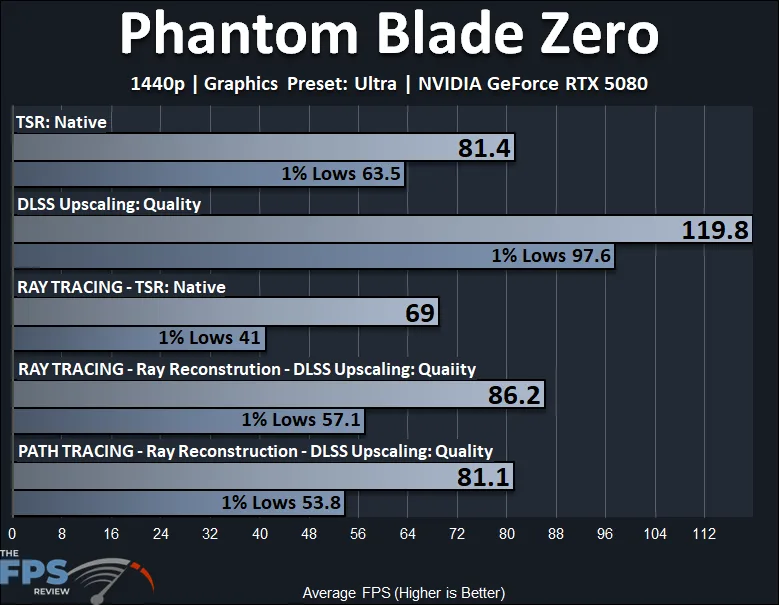
Moving down to the GeForce RTX 5080, we need to drop down to 1440p in order to properly test Ray Tracing and Path Tracing performance. Starting at TSR: Native, average FPS is 81 FPS and 1% Lows are playable. When we enable Ray Tracing at TSR: Native, performance drops by 15%. When we enable DLSS: Upscaling, performance increases by 47% without Ray Tracing. Therefore, when we enable DLSS: Upscaling with Ray Reconstruction and Ray Tracing, performance is at 86 FPS, and 1% Lows are almost at 60FPS. This is a 28% drop compared to No Ray Tracing, quite a bit larger with DLSS Upscaling enabled than without. When we enable Path Tracing, performance drops by only 6%, so that is a small decrease in performance with Path Tracing.
NVIDIA GeForce RTX 5070 Ti
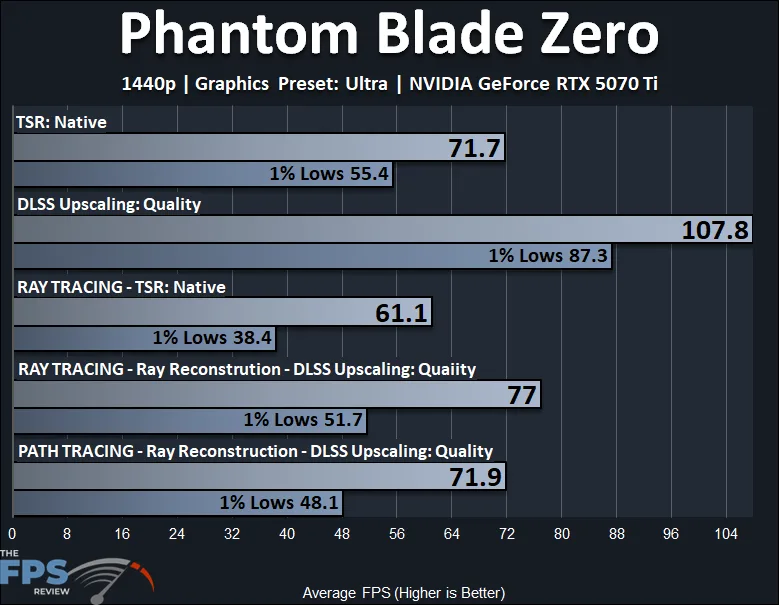
With the GeForce RTX 5070 Ti, we are also running at 1440p. Now this card is almost playable at 1440p TSR: Native, but really we’d prefer to play with DLSS Upscaling enabled to get 107FPS average and 87FPS 1% Lows. Enabling traditional Ray Tracing drops performance by 15%. Enabling DLSS Upscaling improves performance by 50% compared to TSR: Native. When we enable Ray Tracing with DLSS Ray Reconstruction and Upscaling, performance drops from No Ray Tracing with DLSS by 29%. This is still faster than traditional Ray Tracing at TSR: Native by 26%. Path Tracing only drops performance by 7%.
NVIDIA GeForce RTX 5070
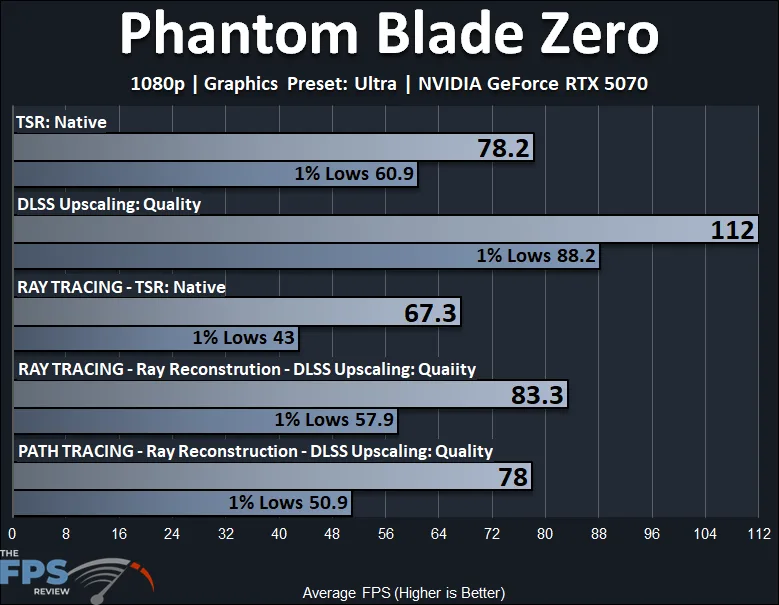
With the GeForce RTX 5070, we just had to drop down to 1080p to properly test Ray Tracing and Path Tracing performance. This video card is playable at 1080p and TSR: Native. Turning on DLSS Upscaling improves performance by 43%. Turning on traditional Ray Tracing drops performance by 14%. When we enable DLSS Ray Reconstruction with DLSS Upscaling, performance increases by 24%, but this is a 40% drop compared to without Ray Tracing. Path Tracing drops performance by just 6%, though.
NVIDIA GeForce RTX 5060 Ti 8GB
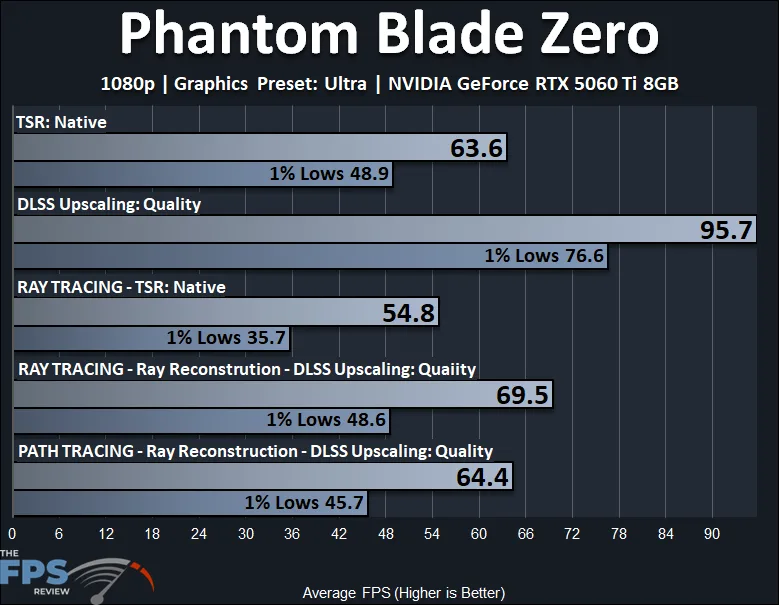
We are really pushing it here with the GeForce RTX 5060 Ti 8GB and its ability to run Ray Tracing and Path Tracing, even at just 1080p. At TSR: Native, the performance is playable on average, but the 1% Lows are not. Enabling DLSS Upscaling does help and improves performance by 50%, and this is very playable. Turning on traditional Ray Tracing drops performance by 13%. When we enable DLSS Ray Reconstruction and Upscaling, performance increases by 27%, but it is still borderline playable. Turning on Path Tracing drops performance, though only by 7%, but it isn’t playable.
NVIDIA GeForce RTX 5060
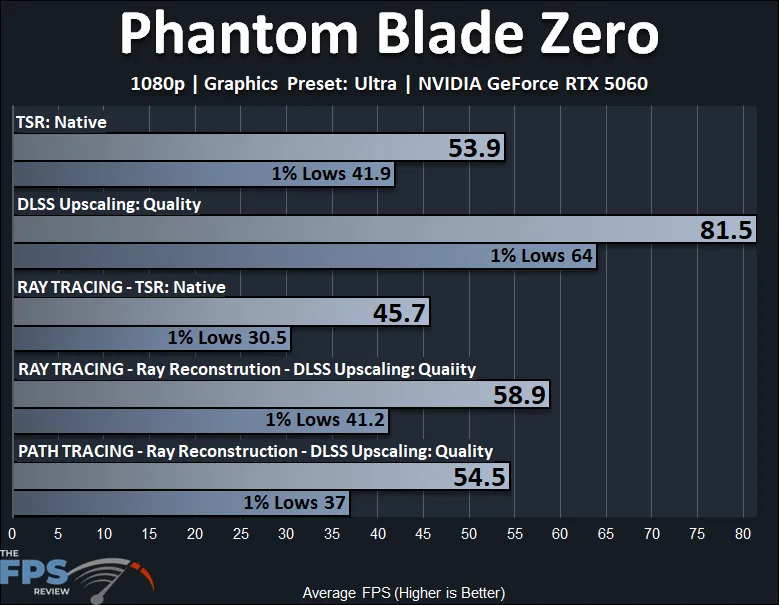
The GeForce RTX 5060 really struggles here, even with just TSR: Native, being unplayable at 1080p on Ultra. Turning on DLSS Upscaling improves performance by 51% and is the only way to make it playable at Ultra. Enabling Ray Tracing drops performance by 15%. With DLSS Ray Reconstruction and DLSS Upscaling, performance increases by 29%, but it is still not playable. Path Tracing only drops performance by 7%, though.
AMD Radeon RX 9070 XT
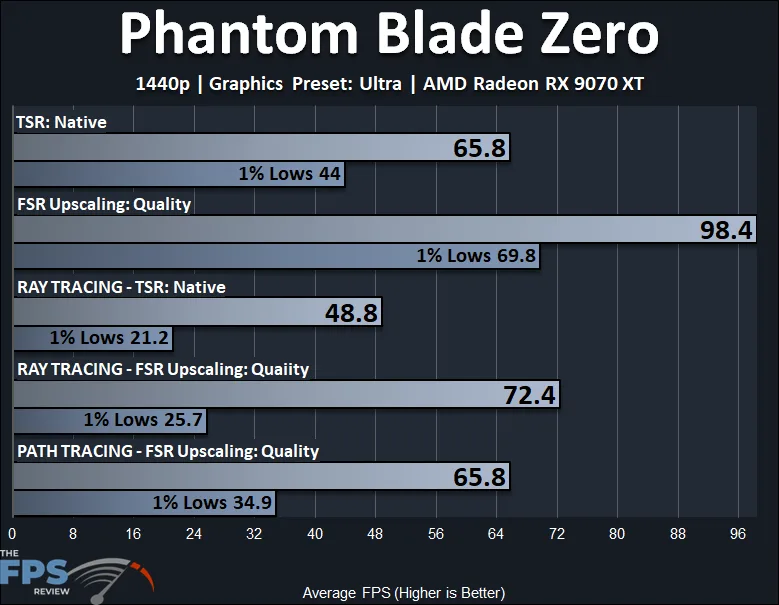
With the AMD Radeon RX 9070 XT, we are running it at 1440p. At TSR: Native, it is borderline playable, with the 1% Lows actually very low at 44FPS. With FSR Upscaling enabled, performance increases by 50% and is really the best way to play the game for performance. Enabling traditional Ray Tracing drops performance quite a bit, by 26%, and is unplayable. Enabling FSR Upscaling improves performance by 48%, and while the average FPS is good, the 1% Lows suffer quite a bit with traditional Ray Tracing enabled on this card. Enabling Path Tracing drops performance by 9%, which is small, but more than the GeForce cards, and the game is not playable at this configuration.
Discussion
Join Discussion →No replies yet. Be the first to reply on the forum.